
Overview

The ServiceNow integration provides workflow actions for creating and updating ServiceNow incidents from Rootly. If you are unfamiliar with how Genius workflows work, visit the Workflows documentation first.

Available Workflow Actions

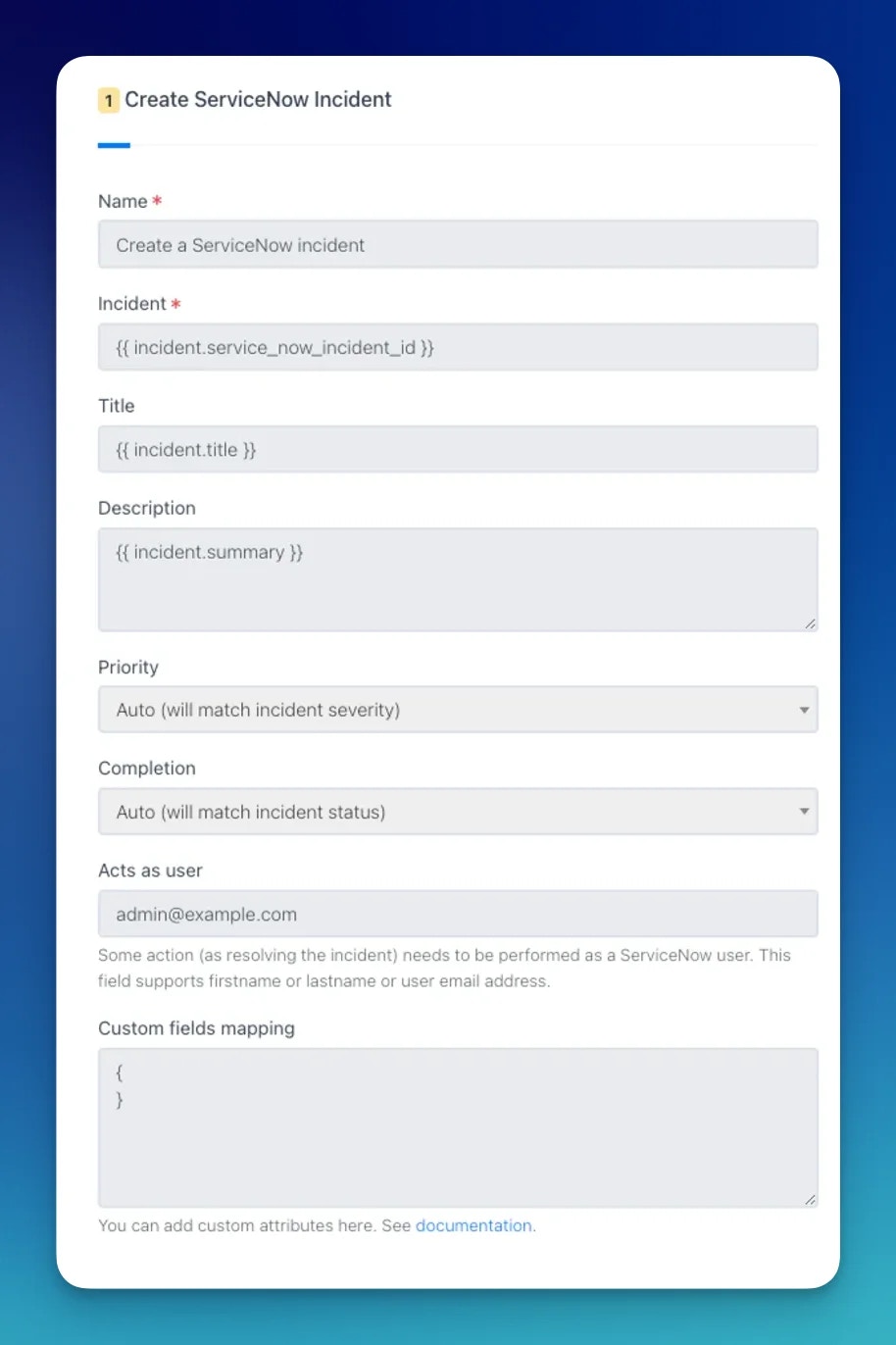
Create a ServiceNow Incident

This action creates a new record in the ServiceNow Incident table (e.g. INC0010001) and links it to the Rootly incident.
FieldDescriptionRequired
NameDisplay name for this workflow action
TitleMaps to short_description in ServiceNow. Supports LiquidYes
DescriptionMaps to description in ServiceNow. Supports Liquid
PriorityMaps to urgency. Auto mirrors the incident severity
StatusMaps to state. Auto mirrors the incident status
Acts As UserName or email of the ServiceNow user to set as caller when resolving. Only active when status is Resolved (6)
Custom Fields MappingJSON of additional ServiceNow fields. Merged directly into the incident payload. Supports Liquid
Priority mapping (Auto)
Rootly SeverityServiceNow Urgency
CriticalHigh (1)
HighHigh (1)
MediumMedium (2)
LowLow (3)
Status mapping (Auto)
Rootly StatusServiceNow State
StartedNew (1)
MitigatedIn Progress (2)
ResolvedResolved (6)
Available states: New (1), In Progress (2), On Hold (3), Resolved (6), Closed (7), Canceled (8).
Acts As User triggers a Zendesk user lookup by first name, last name, or email. When matched, Rootly sets caller_id, close_code, and close_notes automatically. It only applies when the state is set to Resolved (6).
Document Image

Update a ServiceNow Incident

This action updates an existing record in the ServiceNow Incident table.
When a Create a ServiceNow Incident action runs, Rootly stores the resulting sys_id and incident number on the incident record. Reference them in subsequent update actions using Liquid variables.
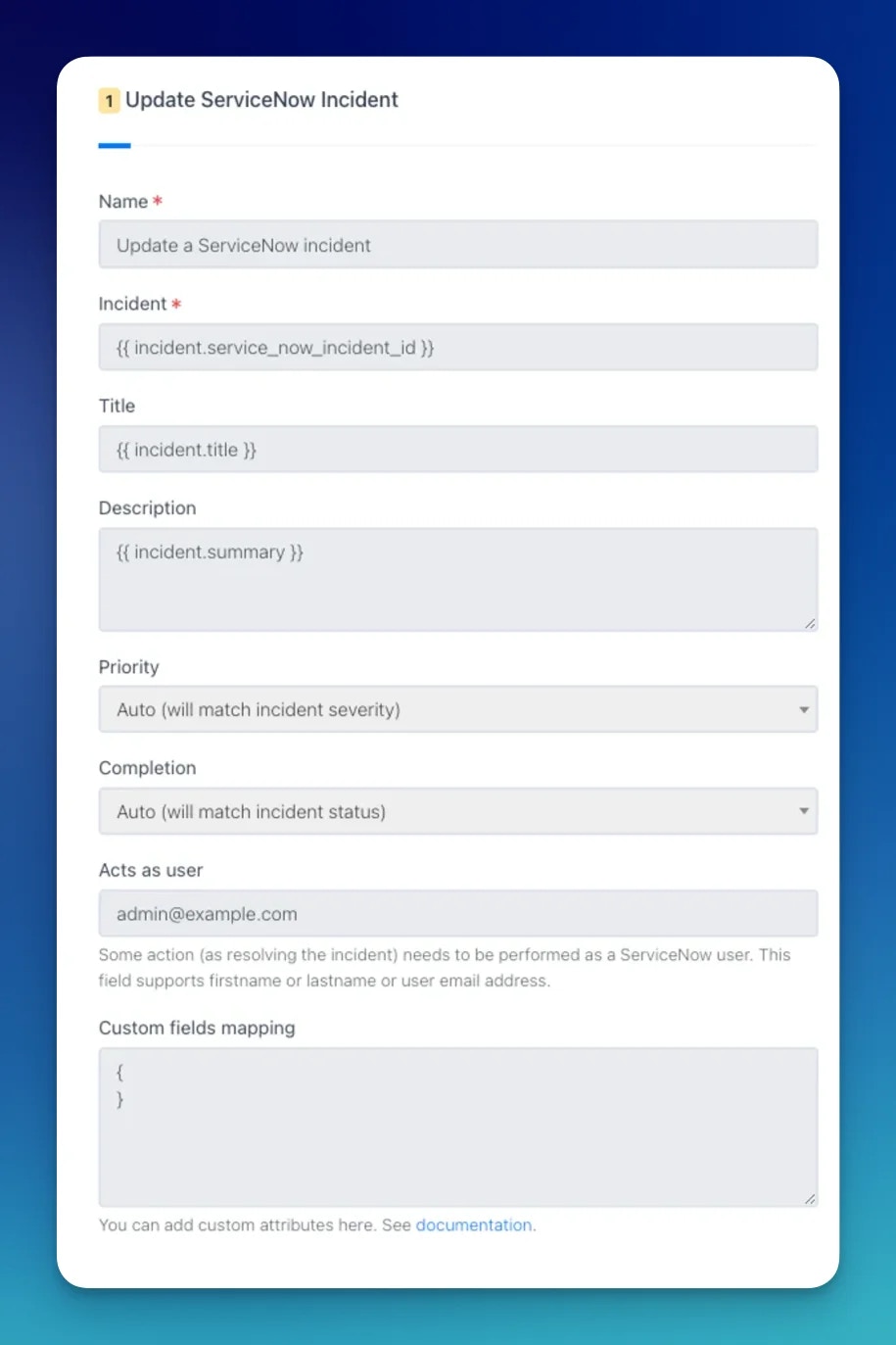
FieldDescriptionRequired
NameDisplay name for this workflow action
Incident IDServiceNow sys_id of the incident to update. Supports LiquidYes
TitleUpdated short_description. Supports Liquid
DescriptionUpdated description. Supports Liquid
PriorityUpdated urgency level
StatusUpdated incident state
Acts As UserName or email of the caller to set when resolving
Custom Fields MappingUpdated custom field values as JSON. Supports Liquid
Document Image

Common Custom Field Examples

Work Notes (Internal)

Work notes are visible only to ServiceNow agents, not customers.
{
  "work_notes": "{{ incident.events[0].event_raw }}"
}

Comments (Customer-Visible)

{
  "comments": "{{ incident.events[0].event_raw }}"
}

Major Incident

{
  "assignment_group": "3De45d9ebc3b333200fe02c9bb34efc434",
  "major_incident_state": "proposed"
}
Major incident state changes may require specific ACL permissions in ServiceNow. See the ServiceNow community for details.

Add Configuration Items (CIs) to an Incident

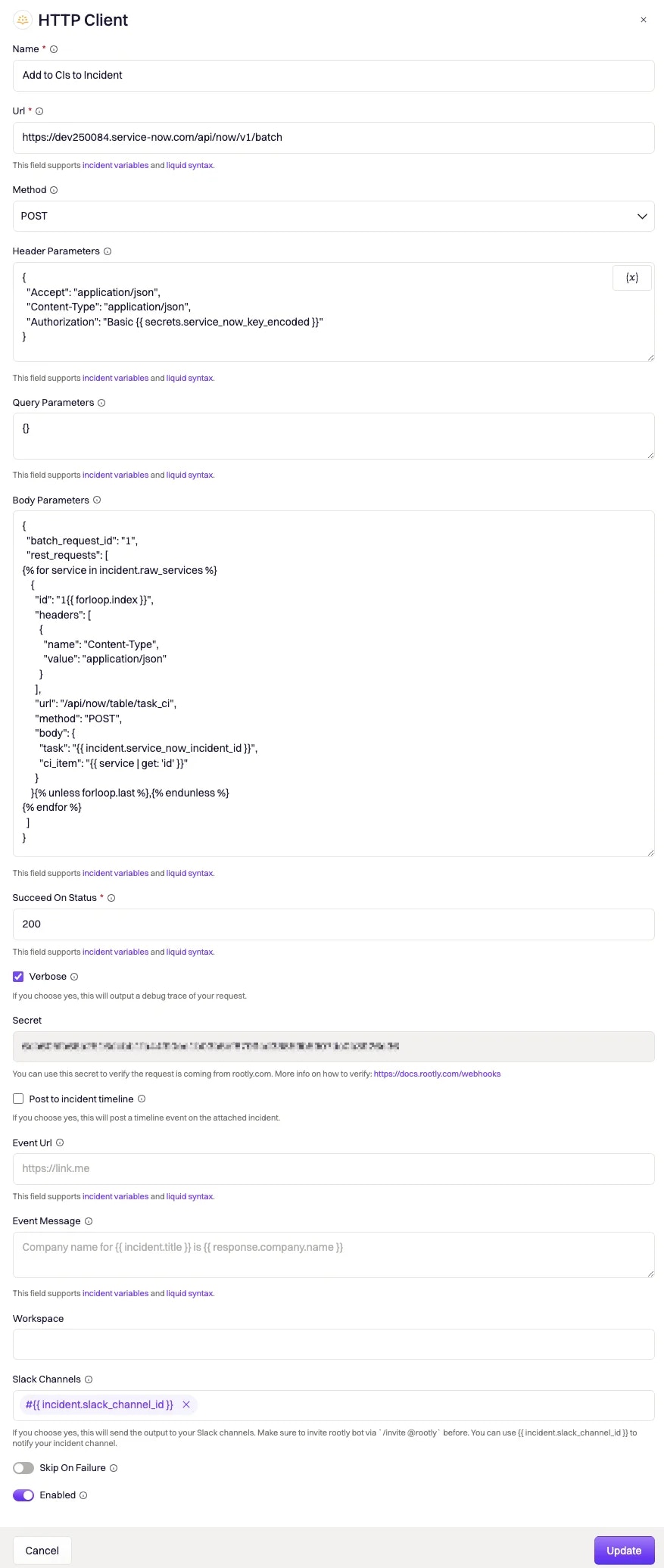
Adding configuration items to a ServiceNow incident requires multiple API calls (one per CI). Use Rootly’s HTTP Client workflow action with the ServiceNow Batch API to consolidate them into a single request.
Document Image

Endpoint

POST https://<instance-domain>.com/api/now/v1/batch

Headers

{
  "Accept": "application/json",
  "Content-Type": "application/json",
  "Authorization": "Basic {{ secrets.service_now_key_encoded }}"
}
Store your Base64-encoded username:password as a Rootly Secret to keep credentials out of plain-text workflow configurations.

Body

Each individual Table API call must have its body Base64-encoded. The following Liquid template dynamically generates one batch entry per service associated with the incident:
{
  "batch_request_id": "1",
  "rest_requests": [
{% for service in genius_workflow_run.newly_added_services %}
{% assign task_value = incident.service_now_incident_id %}
{% assign ci_item_value = service | get: 'service_now_ci_sys_id' %}
{% assign body_string = '{ "task": "' | append: task_value | append: '", "ci_item": "' | append: ci_item_value | append: '" }' %}
    {
      "id": "1{{ forloop.index }}",
      "headers": [{ "name": "Content-Type", "value": "application/json" }],
      "url": "/api/now/table/task_ci",
      "method": "POST",
      "body": "{{ body_string | base64_encode }}"
    }{% unless forloop.last %},{% endunless %}
{% endfor %}
  ]
}
To use this template, each ServiceNow CI’s sys_id must be linked to the equivalent Rootly service using the service_now_ci_sys_id field.

Succeed On Status

Set to 200. The ServiceNow Batch API returns 200 (not 201) on success.