

Incident Property Field
The incident property is what is used to base the dynamic forms from. The options include Incident Type, Team, or Severity.This field is important — it drives the property you build your dynamic forms from.
+ New Form Set to create a dynamic form.
Creating Form Set
string
required
A unique name for this form set.
incident property condition
The condition that decides when the form set applies — driven off incident type, team, or severity depending on the property you picked above.
Example Use Case
One of the main use cases for this is when you want to give more granularity on different teams, incident types, or severities, but you want them to have different versions of the same form. For example, when the information I want to collect for thesecurity teams incidents is different than the information I want to collect for the infrastructure teams incidents. But within that, within the security teams forms, I actually want certain fields different based on if it’s a SEV0 incident.
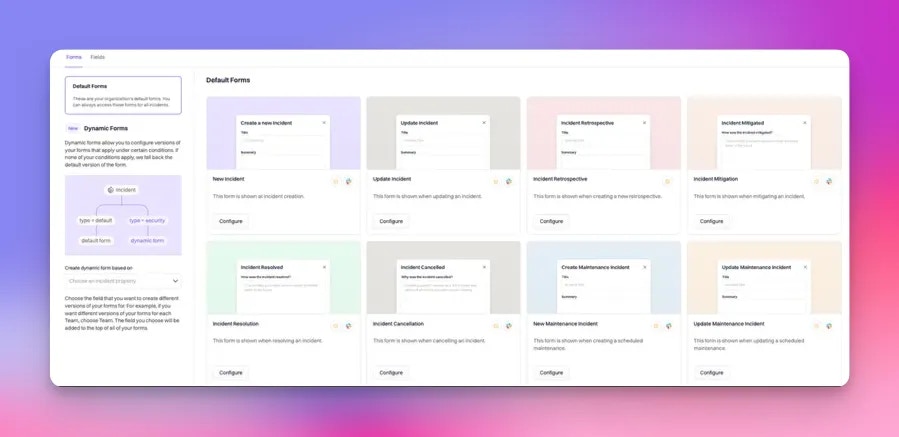
Click ‘Create Form Set’. Once created, you’ll see the newly built ‘Security Team Forms’ on the left and the form types you wish to customize. These new forms will only show when Team is Security.
Next, get more granular and only show these forms when the Team is Security AND the Severity is a SEV0. To do this, click ‘Configure’ on the form type you would like to edit.
The form will start empty, minus your incident property field, which in this case is Teams.
Add any custom or built-in fields by clicking ‘Add Fields’. When the required fields are selected, click ‘Add Fields’.
Edit each field and choose when to display and/or require this field — at this stage you can add conditions.
Set the field to only display when the incident is a SEV0. Require it only if responders can answer it in seconds: a SEV0 is the worst moment to add friction to declaring. Anything else is better asked on the Update Incident form once someone is working the problem. Click Save once the conditions are defined.
To Test
Create a new incident and set the team toSecurity. Once <Security team> is selected, the form will auto-refresh with the dynamic ‘Security Team Form’.