> ## Documentation Index
> Fetch the complete documentation index at: https://docs.rootly.com/llms.txt
> Use this file to discover all available pages before exploring further.
# Creating Sub-Incidents via Slack
> Create sub-incidents directly from Slack incident channels using the /rootly sub command and interactive dialog to track related issues separately.
## Overview
Create sub-incidents directly from an incident’s Slack channel using Rootly slash commands.\
Sub-incidents help teams split large or cross-functional incidents into focused workstreams while keeping everything tied back to the parent incident.
***
## Restrictions
Sub-incident creation is only available when:
* You run the command **inside an incident channel**
* The incident is **not already a sub-incident**
* You have **permission to create incidents**
* The incident has no restrictions (e.g., cannot split a sub-incident)
If these conditions are not met, Slack will show an appropriate error.
***
## How to Create a Sub-Incident in Slack
### 1. Run the sub-incident command
In the parent incident channel, type **any** of the following:
```
/rootly sub
/rootly split
/rootly fork
/rootly swimlane
```
These commands all trigger the **Create Sub-Incident** dialog.
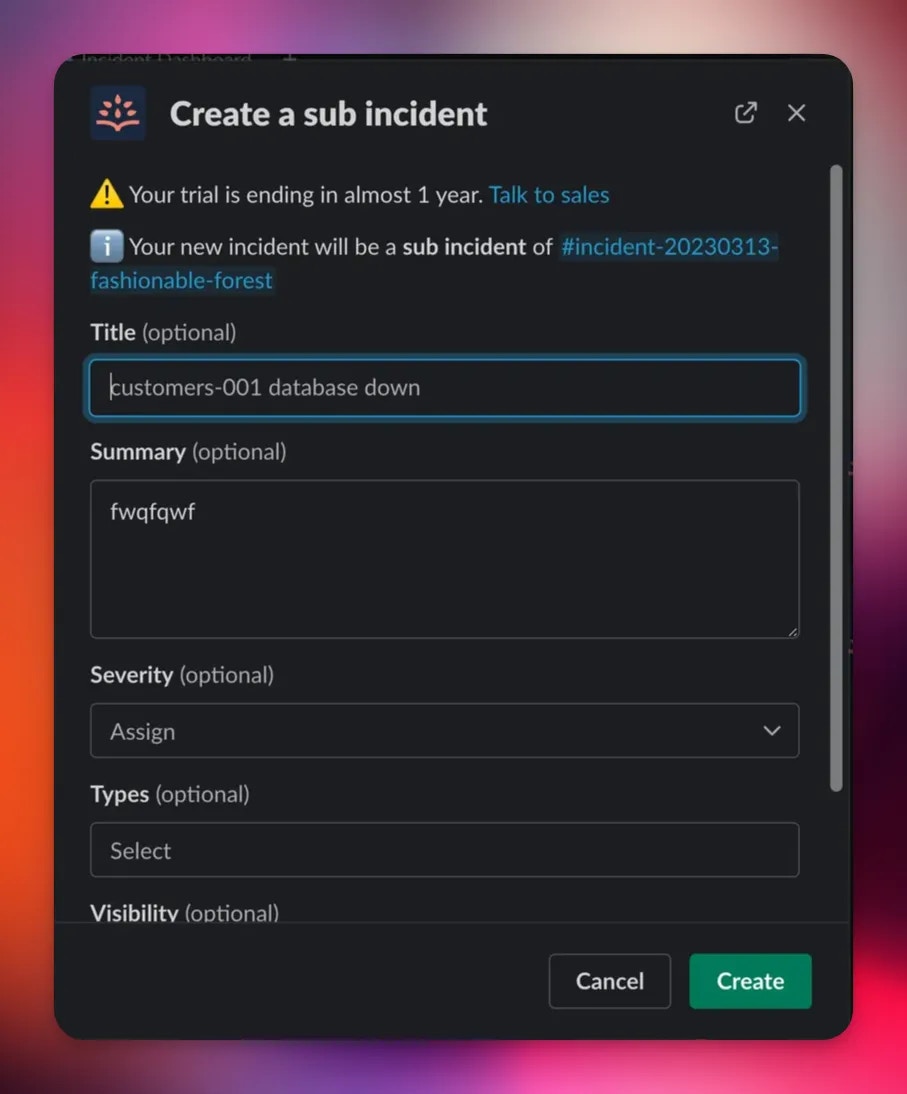 ***
### 2. Complete the creation dialog
Fill in the incident fields as you normally would.\
Rootly automatically links the new incident as a **sub-incident** of the channel you ran the command from.
After submitting, Slack will confirm that the sub-incident has been created:
***
### 2. Complete the creation dialog
Fill in the incident fields as you normally would.\
Rootly automatically links the new incident as a **sub-incident** of the channel you ran the command from.
After submitting, Slack will confirm that the sub-incident has been created:
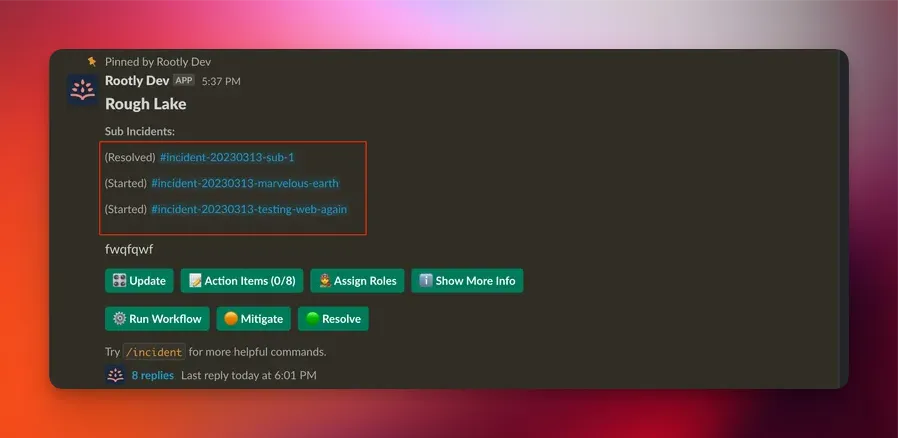 You’ll then see a reference to the new sub-incident in the parent incident’s summary, Slack channel, and web interface.
***
## What Happens Behind the Scenes
Rootly automatically:
* Sets the new incident’s **parent\_incident\_id**
* Assigns a sub-incident kind (e.g., `normal_sub`, `scheduled_sub`)
* Attributes the creation to **Slack**
* Optionally creates a **Slack channel** for the sub-incident (team settings apply)
* Triggers any workflows conditioned on\
`Kind → is one of → normal_sub / scheduled_sub / test_sub`
Sub-incidents created via Slack behave exactly the same as those created in the Web UI. They inherit parent properties according to your workspace configuration and any workflows you've defined on sub-incident creation.
***
## Demo
***
## Best Practices
* **Use sub-incidents to divide ownership** across SRE, Security, Networking, or other teams.
* **Keep the parent incident customer-facing** while sub-incidents track internal or deep-dive workstreams.
* **Use workflows to automate structure**, such as creating roles or tasks for each new sub-incident.
* **Name sub-incidents clearly** to reflect their specific investigative track.
* Avoid splitting unless the scope is meaningfully distinct—small tasks are usually better captured as action items.
***
## Troubleshooting
Slack restricts `/rootly sub` to **incident channels only**.\
Run the command inside the relevant incident channel.
Sub-incidents cannot be split further.\
Create sub-incidents **from parent incidents only**.
Your role does not have permission to create incidents.\
Contact your Rootly admin to update your permissions.
This may occur if:
* Required fields were left blank
* Your Slack integration is temporarily disconnected
* A workflow with a blocking condition prevented sub-incident creation
Ensure that:
* The originating channel was the correct **parent incident channel**
* The parent incident is not archived or cancelled
* The sub-incident was created successfully (Slack will show a confirmation)
You’ll then see a reference to the new sub-incident in the parent incident’s summary, Slack channel, and web interface.
***
## What Happens Behind the Scenes
Rootly automatically:
* Sets the new incident’s **parent\_incident\_id**
* Assigns a sub-incident kind (e.g., `normal_sub`, `scheduled_sub`)
* Attributes the creation to **Slack**
* Optionally creates a **Slack channel** for the sub-incident (team settings apply)
* Triggers any workflows conditioned on\
`Kind → is one of → normal_sub / scheduled_sub / test_sub`
Sub-incidents created via Slack behave exactly the same as those created in the Web UI. They inherit parent properties according to your workspace configuration and any workflows you've defined on sub-incident creation.
***
## Demo
***
## Best Practices
* **Use sub-incidents to divide ownership** across SRE, Security, Networking, or other teams.
* **Keep the parent incident customer-facing** while sub-incidents track internal or deep-dive workstreams.
* **Use workflows to automate structure**, such as creating roles or tasks for each new sub-incident.
* **Name sub-incidents clearly** to reflect their specific investigative track.
* Avoid splitting unless the scope is meaningfully distinct—small tasks are usually better captured as action items.
***
## Troubleshooting
Slack restricts `/rootly sub` to **incident channels only**.\
Run the command inside the relevant incident channel.
Sub-incidents cannot be split further.\
Create sub-incidents **from parent incidents only**.
Your role does not have permission to create incidents.\
Contact your Rootly admin to update your permissions.
This may occur if:
* Required fields were left blank
* Your Slack integration is temporarily disconnected
* A workflow with a blocking condition prevented sub-incident creation
Ensure that:
* The originating channel was the correct **parent incident channel**
* The parent incident is not archived or cancelled
* The sub-incident was created successfully (Slack will show a confirmation)