> ## Documentation Index
> Fetch the complete documentation index at: https://docs.rootly.com/llms.txt
> Use this file to discover all available pages before exploring further.
# Creating Sub-Incidents
> Learn how to split large incidents into sub-incidents for better organization across multiple teams, with workflow automation support.
## Overview
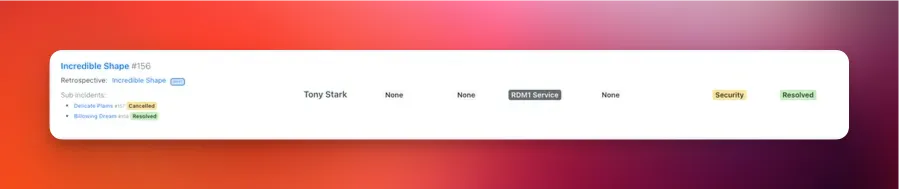
For larger or cross-functional incidents, you may want to break work into **sub-incidents**.\
A sub-incident allows a team to investigate, coordinate, and track their scope independently—while maintaining shared context with the parent incident.
Each parent incident can have **multiple sub-incidents**.
 ***
## What Is a Sub-Incident?
A sub-incident is a normal incident that is linked to a parent using `parent_incident_id`.\
Rootly automatically assigns the sub-incident a kind based on its parent:
* `normal_sub`
* `test_sub`
* `scheduled_sub`
Sub-incidents are **not** the same as duplicate incidents.\
Duplicates link via `duplicate_incident_id` and do *not* form a hierarchy.
***
## Restrictions
* Sub-incidents **cannot be split further** (no nested sub-incidents).
* A sub-incident **must have** a parent incident.
* You cannot create a sub-incident **from an existing sub-incident**.
* Some UI options (like “Attach to Parent Incident”) only appear when:
* The incident is not already a sub-incident
* It has no existing sub-incidents
* You have permission to create incidents
***
## Creating Sub-Incidents
Rootly supports creating sub-incidents through two interfaces:
1. **Slack** – Use commands such as `/rootly sub`, `/rootly split`, `/rootly fork`, or `/rootly swimlane`\
→ [**See the Slack guide →**](/incidents/incident-operations/slack-creating-a-sub-incident)
2. **Web** – Use **Create Sub-Incident** or **Attach to Parent Incident** from the incident menu\
→ [**See the Web guide →**](/incidents/incident-operations/web-creating-a-sub-incident)
***
### Slack Creation
Use any of the following commands in the **parent incident’s Slack channel**:
```
/rootly split
/rootly sub
/rootly fork
/rootly swimlane
```
This opens the **Create Sub-Incident** modal, already linked to the parent.
Slack enforces:
* You must be in an incident channel
* The parent cannot itself be a sub-incident
* You must have permission to create incidents
Slack-created sub-incidents use the same logic as Web-created sub-incidents, including workflow triggers and automatic Slack-channel creation (when enabled).
***
### Web Creation
From the parent incident:
* Click **…** → **Create Sub-Incident**, or
* Use **Attach to Parent Incident** to convert an existing incident into a sub-incident
***
## What Is a Sub-Incident?
A sub-incident is a normal incident that is linked to a parent using `parent_incident_id`.\
Rootly automatically assigns the sub-incident a kind based on its parent:
* `normal_sub`
* `test_sub`
* `scheduled_sub`
Sub-incidents are **not** the same as duplicate incidents.\
Duplicates link via `duplicate_incident_id` and do *not* form a hierarchy.
***
## Restrictions
* Sub-incidents **cannot be split further** (no nested sub-incidents).
* A sub-incident **must have** a parent incident.
* You cannot create a sub-incident **from an existing sub-incident**.
* Some UI options (like “Attach to Parent Incident”) only appear when:
* The incident is not already a sub-incident
* It has no existing sub-incidents
* You have permission to create incidents
***
## Creating Sub-Incidents
Rootly supports creating sub-incidents through two interfaces:
1. **Slack** – Use commands such as `/rootly sub`, `/rootly split`, `/rootly fork`, or `/rootly swimlane`\
→ [**See the Slack guide →**](/incidents/incident-operations/slack-creating-a-sub-incident)
2. **Web** – Use **Create Sub-Incident** or **Attach to Parent Incident** from the incident menu\
→ [**See the Web guide →**](/incidents/incident-operations/web-creating-a-sub-incident)
***
### Slack Creation
Use any of the following commands in the **parent incident’s Slack channel**:
```
/rootly split
/rootly sub
/rootly fork
/rootly swimlane
```
This opens the **Create Sub-Incident** modal, already linked to the parent.
Slack enforces:
* You must be in an incident channel
* The parent cannot itself be a sub-incident
* You must have permission to create incidents
Slack-created sub-incidents use the same logic as Web-created sub-incidents, including workflow triggers and automatic Slack-channel creation (when enabled).
***
### Web Creation
From the parent incident:
* Click **…** → **Create Sub-Incident**, or
* Use **Attach to Parent Incident** to convert an existing incident into a sub-incident
 When attaching an existing incident, Rootly updates its kind and sets its parent relationship.
***
## What Gets Inherited?
Depending on your configuration, sub-incidents may inherit:
* Severity
* Status
* Privacy settings
* Incident types
* Attached services, functionalities, environments
* Teams / groups
* Jira epic or Google Drive folder links
* Slack channel creation settings
* Parent → sub or sub → parent timeline syncing (feature-flag dependent)
When **timeline syncing** is enabled, updates may automatically propagate between related incidents—excluding internal-only events.
***
## Configuring Workflows for Sub-Incidents
Sub-incidents are fully compatible with Rootly Workflows.
To target sub-incidents, set a workflow condition such as:
```
Kind → is one of → normal_sub, test_sub, scheduled_sub
```
Use cases include:
* Creating role assignments for sub-incident teams
* Syncing updates to the parent incident
* Auto-generating investigative tasks
* Auto-creating a Slack channel for each sub-incident
***
## Best Practices
* **Use sub-incidents to delegate ownership** to teams like SRE, Security, or Networking.
* **Keep the parent incident customer-facing**, using sub-incidents to track internal workstreams.
* **Use workflows to create structure**, such as templated tasks, roles, or Slack-channel creation.
* Use the `Create a sub incident` Workflow Action to automatically create a sub-incident for specific scenarios, like being able to coordinate with stakeholders outside of your engineering response teams. [See this in action here](https://www.loom.com/share/e6f038a78d8e4dec8a51c06e557e4298).
* **Avoid unnecessary splitting**—small tasks can often stay in the parent incident.
* **Name sub-incidents cleanly and consistently**, reflecting the scope of work.
***
## Troubleshooting
This occurs when:
* The incident is **already a sub-incident**
* It has its **own sub-incidents**
* You do not have **permission to create incidents**
Slack prevents splitting when:
* You are not in an incident channel
* The incident is a **sub-incident**
* You lack required permissions
Inheritance depends on:
* Feature flags (parent/sub sync)
* Workflows that override defaults
* Creation method (Slack vs Web)
* Privacy restrictions
Parent and sub-incident timeline syncing must be enabled for your account. Once it is:
* The incidents must be linked as parent and sub-incident.
* Only **non-internal** timeline events sync. Events marked internal stay on the incident where they were added.
If updates still do not sync after confirming both, contact Rootly support to check that syncing is enabled for your account.
This happens when:
* The incident is already a sub-incident
* It has existing sub-incidents
* It is a scheduled maintenance incident
* Permissions prevent linking
Sub-incidents group parallel workstreams of one active event, and
[marking as duplicate](/incidents/incident-operations/marking-as-duplicate)
links two records of the same event. For a failure that keeps coming back
across separate incidents, tag the incidents instead:
1. Pick a marker: an incident **Type**, a **Cause**, or a
[custom field](/configuration/custom-fields), or a combination.
2. Set it on each incident during the response or in the retrospective.
3. Filter the incidents list by that marker to see the full set of
matching incidents in one view.
4. To analyze the set — recurrence, severity, time to resolve — add a
[custom dashboard panel](/metrics/customized-dashboards) with a
panel-level filter on the same marker. Dashboard-level filters cover
date range, period, team, and service; Type, Cause, and custom fields
are configured per panel.
You can also pull the tagged set through the API to analyze recurring
themes externally.
When attaching an existing incident, Rootly updates its kind and sets its parent relationship.
***
## What Gets Inherited?
Depending on your configuration, sub-incidents may inherit:
* Severity
* Status
* Privacy settings
* Incident types
* Attached services, functionalities, environments
* Teams / groups
* Jira epic or Google Drive folder links
* Slack channel creation settings
* Parent → sub or sub → parent timeline syncing (feature-flag dependent)
When **timeline syncing** is enabled, updates may automatically propagate between related incidents—excluding internal-only events.
***
## Configuring Workflows for Sub-Incidents
Sub-incidents are fully compatible with Rootly Workflows.
To target sub-incidents, set a workflow condition such as:
```
Kind → is one of → normal_sub, test_sub, scheduled_sub
```
Use cases include:
* Creating role assignments for sub-incident teams
* Syncing updates to the parent incident
* Auto-generating investigative tasks
* Auto-creating a Slack channel for each sub-incident
***
## Best Practices
* **Use sub-incidents to delegate ownership** to teams like SRE, Security, or Networking.
* **Keep the parent incident customer-facing**, using sub-incidents to track internal workstreams.
* **Use workflows to create structure**, such as templated tasks, roles, or Slack-channel creation.
* Use the `Create a sub incident` Workflow Action to automatically create a sub-incident for specific scenarios, like being able to coordinate with stakeholders outside of your engineering response teams. [See this in action here](https://www.loom.com/share/e6f038a78d8e4dec8a51c06e557e4298).
* **Avoid unnecessary splitting**—small tasks can often stay in the parent incident.
* **Name sub-incidents cleanly and consistently**, reflecting the scope of work.
***
## Troubleshooting
This occurs when:
* The incident is **already a sub-incident**
* It has its **own sub-incidents**
* You do not have **permission to create incidents**
Slack prevents splitting when:
* You are not in an incident channel
* The incident is a **sub-incident**
* You lack required permissions
Inheritance depends on:
* Feature flags (parent/sub sync)
* Workflows that override defaults
* Creation method (Slack vs Web)
* Privacy restrictions
Parent and sub-incident timeline syncing must be enabled for your account. Once it is:
* The incidents must be linked as parent and sub-incident.
* Only **non-internal** timeline events sync. Events marked internal stay on the incident where they were added.
If updates still do not sync after confirming both, contact Rootly support to check that syncing is enabled for your account.
This happens when:
* The incident is already a sub-incident
* It has existing sub-incidents
* It is a scheduled maintenance incident
* Permissions prevent linking
Sub-incidents group parallel workstreams of one active event, and
[marking as duplicate](/incidents/incident-operations/marking-as-duplicate)
links two records of the same event. For a failure that keeps coming back
across separate incidents, tag the incidents instead:
1. Pick a marker: an incident **Type**, a **Cause**, or a
[custom field](/configuration/custom-fields), or a combination.
2. Set it on each incident during the response or in the retrospective.
3. Filter the incidents list by that marker to see the full set of
matching incidents in one view.
4. To analyze the set — recurrence, severity, time to resolve — add a
[custom dashboard panel](/metrics/customized-dashboards) with a
panel-level filter on the same marker. Dashboard-level filters cover
date range, period, team, and service; Type, Cause, and custom fields
are configured per panel.
You can also pull the tagged set through the API to analyze recurring
themes externally.