> ## Documentation Index
> Fetch the complete documentation index at: https://docs.rootly.com/llms.txt
> Use this file to discover all available pages before exploring further.

# Severities

> Configure incident severity levels, calibrate a severity matrix for your team, and use severities to drive workflows, escalations, and status pages.

export const SeverityPicker = () => {
  const [choice, setChoice] = useState(null);
  const resultRef = useRef(null);
  useEffect(() => {
    if (choice && resultRef.current) {
      resultRef.current.focus();
    }
  }, [choice]);
  const focus = "focus:outline-none focus-visible:ring-2 focus-visible:ring-[#5446a2] focus-visible:ring-offset-1 focus-visible:ring-offset-white dark:focus-visible:ring-offset-[#292523]";
  const sevAccent = {
    SEV0: {
      bar: "#c4231c",
      chipBg: "#fde8e8",
      chipText: "#7c1210",
      chipBgDark: "#85221e",
      chipTextDark: "#fcdbda"
    },
    SEV1: {
      bar: "#ed8f17",
      chipBg: "#fdeeb7",
      chipText: "#5c2f13",
      chipBgDark: "#78411d",
      chipTextDark: "#fde595"
    },
    SEV2: {
      bar: "#c28e00",
      chipBg: "#f8f8bb",
      chipText: "#5c3808",
      chipBgDark: "#7f500c",
      chipTextDark: "#f5f299"
    },
    SEV3: {
      bar: "#487cb0",
      chipBg: "#dceaf4",
      chipText: "#22405f",
      chipBgDark: "#355f89",
      chipTextDark: "#cbe0f0"
    },
    Triage: {
      bar: "#7748f6",
      chipBg: "#ececf8",
      chipText: "#39316c",
      chipBgDark: "#5446a2",
      chipTextDark: "#d7d7f0"
    }
  };
  const btnBase = `inline-flex items-center justify-center gap-1 whitespace-nowrap cursor-pointer transition-colors font-medium ${focus}`;
  const btnPrimary = `${btnBase} h-8 px-3 text-[14px] leading-[18px] rounded-[4px] bg-[#7748f6] text-white hover:bg-[#6734bd] dark:bg-[#a88bee] dark:hover:bg-[#bca8f3]`;
  const btnSecondary = `${btnBase} h-8 px-3 text-[14px] leading-[18px] rounded-[4px] bg-[#f7f7f6] dark:bg-[#3b3733] border border-[#dcd9d7] dark:border-[#4a4741] text-[#292523] dark:text-[#e7e5e4] hover:bg-[#f0f0ef] dark:hover:bg-[#4a4741]`;
  const options = [{
    id: "sev0",
    label: "Total outage, active data loss, or security breach",
    example: "The product is unreachable for everyone. Or: user data is being lost / exposed right now."
  }, {
    id: "sev1",
    label: "Major feature broken for a large segment, no workaround",
    example: "Checkout down for all customers. Or: login fails for 40% of users."
  }, {
    id: "sev2",
    label: "Feature partially broken or performance degraded, workaround exists",
    example: "Report exports fail intermittently but retries succeed. Or: search is slow but functional."
  }, {
    id: "sev3",
    label: "Minor issue, cosmetic bug, or affects a very small number of users",
    example: "Timestamp shows the wrong timezone. Or: a specific edge case in a low-traffic flow."
  }, {
    id: "unknown",
    label: "Impact is still being assessed — I don't know yet",
    example: "Alert fired, someone's investigating, but scope isn't clear."
  }];
  const results = {
    sev0: {
      severity: "SEV0",
      rationale: "SEV0 is reserved for incidents where every user is affected, or where data integrity / security is being compromised. Ambiguity or partial impact belongs at SEV1 or lower. Declaring SEV0 pulls in the full response process — page all-hands, executive comms, status-page update.",
      next: ["Declare with /rootly new and pick SEV0.", "Confirm someone is Incident Commander before starting mitigation.", "Post first status-page update within 5 minutes."],
      caveat: "If you're unsure whether it's a full outage vs a large partial outage, err on the side of SEV0 and downgrade to SEV1 within 15 minutes if scope narrows. Better to over-page briefly than to under-respond to a real customer-wide event."
    },
    sev1: {
      severity: "SEV1",
      rationale: "SEV1 covers major feature breakage impacting a substantial user segment with no user-facing workaround. Response is still 24/7 and requires an Incident Commander, but the blast radius is scoped — not the whole product.",
      next: ["Declare with /rootly new and pick SEV1.", "Page the owning team's on-call.", "Update the status page if the affected feature is customer-facing."],
      caveat: "If mitigation reveals data was involved (loss, corruption, or exposure), escalate to SEV0 immediately. Data-plane impact almost always outranks scope-of-impact heuristics."
    },
    sev2: {
      severity: "SEV2",
      rationale: "SEV2 covers partial breakage or performance degradation where users can still get their job done through a workaround. Response is business-hours-driven for most teams; on-call is paged but not for immediate all-hands attention.",
      next: ["Declare with /rootly new and pick SEV2.", "Page the owning team's on-call — expected work cadence is business hours unless the incident escalates.", "Consider a status-page update if the workaround isn't obvious to affected users."],
      caveat: "Every team calibrates SEV2 differently — some page immediately for hands-on triage, others treat it as a business-hours issue. Confirm your team's convention. Also watch user-impact metrics over the next hour: if the affected segment grows or the workaround stops working, upgrade to SEV1."
    },
    sev3: {
      severity: "SEV3",
      rationale: "SEV3 tracks minor issues, cosmetic bugs, or edge cases affecting a small user cohort. These belong on the roadmap alongside normal work, not in the incident lifecycle. The main reason to still declare an incident (vs a bug ticket) is when the same low-impact issue starts appearing frequently and warrants pattern-tracking.",
      next: ["If a single instance: file a bug ticket instead of an incident.", "If recurring / worth incident-lifecycle tracking: /rootly new at SEV3.", "Skip the status-page update — this level of issue rarely warrants one."],
      caveat: "If several SEV3s cluster around the same root cause, that pattern IS a higher-severity issue. Consider retroing the cluster and declaring a SEV2 for the underlying problem."
    },
    unknown: {
      severity: "Triage",
      rationale: "Start in the Triage status (not a SEV level yet). This lets you evaluate signals — is the alert real? Is impact real? — before formally beginning response. Once scope is clear, promote to Started at the right severity.",
      next: ["Declare with /rootly new and set status to Triage.", "Investigate impact scope with the on-call engineer.", "Once impact is known, transition to Started and set the right severity from this picker."],
      caveat: "Don't stay in Triage for more than ~15 minutes on production-impacting signals. If you can't determine impact quickly, escalate to a real severity to bring in more responders — you can always downgrade later."
    }
  };
  if (choice) {
    const r = results[choice];
    const accent = sevAccent[r.severity];
    return <div ref={resultRef} tabIndex={-1} className="my-4 rounded-[8px] border border-[#dcd9d7] dark:border-[#4a4741] overflow-hidden focus:outline-none focus-visible:ring-2 focus-visible:ring-[#5446a2]" role="status" aria-live="polite">
        {}
        <div style={{
      backgroundColor: accent.bar
    }} className="h-1 w-full" />

        {}
        <div className="flex items-center justify-between px-4 py-3 bg-[#fcfbfa] dark:bg-[#3b3733] border-b border-[#dcd9d7] dark:border-[#4a4741] flex-wrap gap-2">
          <div>
            <div className="text-[11px] leading-4 font-semibold uppercase tracking-wider text-[#57534d] dark:text-[#a6a09b] mb-0.5">
              Recommended severity
            </div>
            <div className="flex items-center gap-2">
              <span className="inline-flex items-center rounded-[16px] px-2 py-0.5 text-[14px] leading-[18px] font-bold ring-1 ring-inset" style={{
      backgroundColor: accent.chipBg,
      color: accent.chipText,
      boxShadow: `inset 0 0 0 1px ${accent.bar}33`
    }}>
                {r.severity}
              </span>
            </div>
          </div>
          <div className="flex items-center gap-2 flex-wrap">
            <button type="button" onClick={() => setChoice(null)} className={btnSecondary}>
              ← Start over
            </button>
            <a href="/configuration/severities" className={btnPrimary}>
              Read full docs →
            </a>
          </div>
        </div>

        {}
        <div className="p-4 bg-white dark:bg-[#292523] space-y-4">
          {}
          <div>
            <div className="text-[11px] leading-4 font-semibold uppercase tracking-wider text-[#57534d] dark:text-[#a6a09b] mb-1">
              Why {r.severity}
            </div>
            <div className="text-[14px] leading-[20px] text-[#292523] dark:text-[#e7e5e4]">
              {r.rationale}
            </div>
          </div>

          {}
          <div>
            <div className="text-[11px] leading-4 font-semibold uppercase tracking-wider text-[#57534d] dark:text-[#a6a09b] mb-1">
              What to do next
            </div>
            <ul className="text-[14px] leading-[20px] text-[#292523] dark:text-[#e7e5e4] list-disc pl-5 space-y-1">
              {r.next.map((step, i) => <li key={i}>{step}</li>)}
            </ul>
          </div>

          {}
          {r.caveat && <div className="rounded-[6px] px-3 py-2 ring-1 ring-inset bg-[#fafbd6] dark:bg-[#3e2308] ring-[#f5f299] dark:ring-[#724712] text-[13px] leading-[18px] text-[#7f500c] dark:text-[#f8f8bb]">
              <strong>Caveat:</strong> {r.caveat}
            </div>}
        </div>
      </div>;
  }
  return <div className="my-4 rounded-[8px] border border-[#dcd9d7] dark:border-[#4a4741] overflow-hidden">
      {}
      <div className="px-4 py-3 bg-[#fcfbfa] dark:bg-[#3b3733] border-b border-[#dcd9d7] dark:border-[#4a4741]">
        <div className="text-[14px] leading-[18px] font-semibold text-[#292523] dark:text-[#e7e5e4]">
          Which scenario best matches what you're seeing?
        </div>
        <div className="text-[12px] leading-4 text-[#57534d] dark:text-[#a6a09b] mt-1">
          Pick the option closest to your situation. The picker will recommend a severity and outline what to do next.
        </div>
      </div>

      {}
      <div className="p-4 bg-white dark:bg-[#292523]">
        <div className="flex flex-col gap-2">
          {options.map(opt => <button key={opt.id} type="button" onClick={() => setChoice(opt.id)} className={`w-full text-left p-3 rounded-[8px] border border-[#dcd9d7] dark:border-[#4a4741] bg-[#f7f7f6] dark:bg-[#3b3733] hover:border-[#7748f6] dark:hover:border-[#a88bee] hover:bg-[#f0f0ef] dark:hover:bg-[#4a4741] cursor-pointer transition-colors ${focus}`}>
              <div className="text-[14px] leading-[20px] font-medium text-[#292523] dark:text-[#e7e5e4]">
                {opt.label}
              </div>
              <div className="text-[12px] leading-4 italic text-[#57534d] dark:text-[#a6a09b] mt-1">
                {opt.example}
              </div>
            </button>)}
        </div>

        <div className="mt-4 text-[11px] leading-4 text-[#6c6761] dark:text-[#a6a09b]">
          Your team may calibrate severities differently — treat this as a starting point, not a rulebook. The final call belongs to whoever's declaring the incident.
        </div>
      </div>
    </div>;
};

## What are incident severity levels?

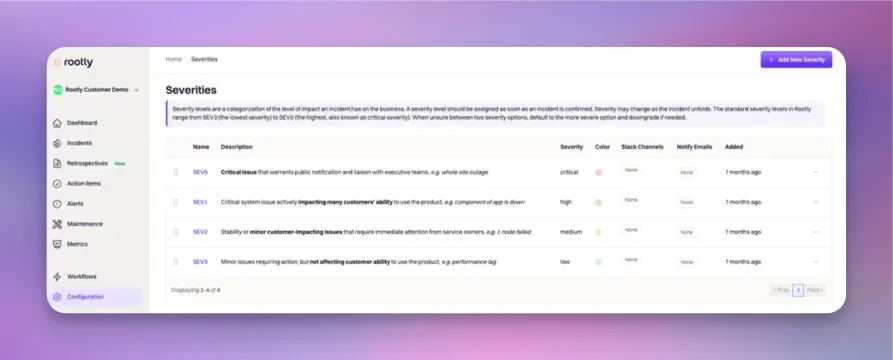
**Severity** is the property that expresses how bad an incident is. It's the single number responders reach for first — "is this a SEV0 or a SEV2?" — because so much else in the response process keys off it: who gets paged, how urgently, whether the status page is updated, what the retrospective template looks like, and how the incident is counted in your metrics.

Severity is a **fixed, single-select property**. Every incident carries exactly one severity value, and that value is fully customizable — pick the number of levels, their names, colors, and behavior that matches how your team actually calibrates impact.

<Frame>
  <img src="https://mintcdn.com/rootly/OVd58onR8faXRZwf/images/configuration/severities.webp?fit=max&auto=format&n=OVd58onR8faXRZwf&q=85&s=54ff85403b6662497256316fec53d8fb" alt="Severity configuration in Rootly Web" width="893" height="360" data-path="images/configuration/severities.webp" />
</Frame>

***

## How Severities Are Used

Severity isn't just a label — it's a lever that other Rootly features pull on:

| Feature                                          | How severity is used                                                                                                                                                                                                                   |
| ------------------------------------------------ | -------------------------------------------------------------------------------------------------------------------------------------------------------------------------------------------------------------------------------------- |
| **[Workflow conditions](/workflows/conditions)** | Filter workflows so they fire only on specific severities. The most common pattern is "page on-call on SEV0/SEV1" or "auto-create Jira ticket on SEV2+".                                                                               |
| **Escalation policies**                          | While escalation policies themselves don't branch on severity directly, workflow-driven paging typically routes different severities to different escalation policies (higher severity = shorter first-step timeout, more responders). |
| **Slack channel + alias notifications**          | Each severity can be linked to Slack channels and user groups (aliases). Workflows use these to auto-invite the right responders and post to the right announcement channels when a severity is set.                                   |
| **Notify emails**                                | Each severity can be linked to email addresses. Workflows use these to send severity-tiered stakeholder notifications.                                                                                                                 |
| **Status page publication**                      | Not automatic per severity — status page publication is decided by workflow conditions that check severity. Most teams auto-publish SEV0/SEV1 and manually decide on SEV2.                                                             |
| **Metrics + reporting**                          | Severity is a top-level filter in every metrics dashboard. MTTR-by-severity is one of the most-referenced numbers in incident review programs.                                                                                         |
| **Retrospective templates**                      | Different severities can trigger different retrospective templates via workflow — SEV0s get the full multi-section review, SEV3s get a lightweight one.                                                                                |

Because so much automation branches on severity, **the shape of your severity matrix drives the shape of your response process**. That's why the picker below and the matrix-design guidance further down matter as much as the attribute configuration.

***

## Which Severity Should I Pick?

Deciding severity under pressure is the hardest part of severity calibration — new responders default to SEV0 out of caution and burn out the team; old hands default to SEV2 out of habit and miss real emergencies. Use the picker below as a starting point when the answer isn't obvious, then refine against your team's specific severity matrix.

<SeverityPicker />

<Note>
  Your team's severity matrix may weight impact dimensions differently (e.g., regulated industries treat data exposure as automatic SEV0; ad-supported businesses may treat revenue-blocking outages as SEV1 even at partial scope). The picker offers a common baseline; the final call belongs to the responder declaring the incident.
</Note>

***

## Designing Your Severity Matrix

There is no universal severity matrix — but there is a small set of patterns that work for most teams. Use these as a starting point, then adjust the wording to match your specific product and customer promises.

### How Many Levels

Most teams land on **four to five severity levels**. Fewer than four and you can't distinguish "everything is broken" from "some things are broken." More than five and calibration becomes fuzzy — SEV4 and SEV5 stop being meaningfully different, and responders default to SEV3 for everything below the top tier.

| Levels                                    | When it fits                                                                                                                                          |
| ----------------------------------------- | ----------------------------------------------------------------------------------------------------------------------------------------------------- |
| **SEV0–SEV3** (four levels)               | Most SaaS teams. Clean top-to-bottom scale with room to distinguish emergency, major, moderate, and minor incidents.                                  |
| **SEV1–SEV5** (five levels)               | Larger engineering orgs with formal incident review programs. Extra granularity helps segment metrics.                                                |
| **SEV0–SEV5** (six levels)                | Overkill for most teams. Consider consolidating unless you have a documented reason each level is used regularly.                                     |
| **P1–P4** or **Critical/High/Medium/Low** | Named tiers are functionally equivalent to numbered tiers. Match whichever naming convention your team already uses in Jira or your incident channel. |

### Impact Dimensions

A well-calibrated matrix considers multiple dimensions of impact — not just "how many users are affected" but also *what* is affected and for how long. Common dimensions:

* **User scope** — everyone, a large segment, a small segment, individual users
* **Feature scope** — entire product, one workflow, one screen, edge case
* **Data integrity** — data loss / corruption / exposure present or not
* **Workaround availability** — none, painful, minor friction, invisible
* **Duration expectation** — active, transient, self-resolving

Not every dimension needs to weight equally. A regulated financial-services company weights data integrity above everything; an ad-supported consumer app weights user scope more heavily. **Explicit weighting is fine and often better than pretending your team treats all dimensions equally.**

### Response Commitments Per Level

Severity levels should tie to **concrete response commitments** so calibration isn't just a name — it's a promise. Common commitments to attach per severity:

* **Paging urgency** — SEV0 pages all-hands immediately; SEV1 pages the owning team; SEV2 pages during business hours; SEV3 assigns without paging
* **Incident Commander required** — SEV0/SEV1 yes, SEV2/SEV3 optional
* **First status-page update within** — SEV0: 5 min · SEV1: 15 min · SEV2: 30 min · SEV3: not required
* **Retrospective required** — SEV0/SEV1 always, SEV2 if user-visible, SEV3 optional
* **Executive notification** — SEV0 immediately, SEV1 within an hour, SEV2/SEV3 in weekly summary

Documenting these commitments in a shared runbook — not just in your head — is what turns severity from a label into an operating agreement.

### Example Matrices

<AccordionGroup>
  <Accordion title="SaaS product, four levels" icon="cloud">
    Common for mid-market SaaS teams with a mix of enterprise and self-serve customers.

    | Level    | Trigger example                                     | First response                                       |
    | -------- | --------------------------------------------------- | ---------------------------------------------------- |
    | **SEV0** | Total outage, active data loss, security breach     | Page all-hands, IC required, status page in 5 min    |
    | **SEV1** | Major feature down for large segment, no workaround | Page owning team, IC required, status page in 15 min |
    | **SEV2** | Partial degradation, workaround available           | Assign to team, business-hours response              |
    | **SEV3** | Minor bug, cosmetic issue                           | File a ticket, roadmap-driven fix                    |
  </Accordion>

  <Accordion title="Regulated industry (fintech / healthtech), five levels" icon="shield">
    Adds a level explicitly for data-integrity events, which typically override user-scope considerations.

    | Level    | Trigger example                                                | First response                                                                                |
    | -------- | -------------------------------------------------------------- | --------------------------------------------------------------------------------------------- |
    | **SEV0** | Total outage or active security breach                         | All-hands, exec notification, status page in 5 min                                            |
    | **SEV1** | Data integrity event (loss, corruption, exposure) at any scale | Page privacy + security + owning team, mandatory retrospective, regulator-notification review |
    | **SEV2** | Major feature broken, large user segment, no workaround        | Page owning team, status page in 15 min                                                       |
    | **SEV3** | Partial degradation, workaround available                      | Business-hours response                                                                       |
    | **SEV4** | Minor bug or cosmetic issue                                    | File a ticket                                                                                 |
  </Accordion>

  <Accordion title="Internal tooling / dev platform, three levels" icon="wrench">
    Fewer levels because customer-facing severity nuance doesn't apply the same way.

    | Level    | Trigger example                                            | First response                    |
    | -------- | ---------------------------------------------------------- | --------------------------------- |
    | **SEV1** | Blocking most engineers (CI, deploys, source control down) | Page platform on-call immediately |
    | **SEV2** | Impacting some workflows (specific integrations broken)    | Assign to team, same-day fix      |
    | **SEV3** | Nuisance-level issues                                      | Ticket, next sprint               |
  </Accordion>
</AccordionGroup>

***

## Configuring Severity Attributes

Configure severities in **Configuration → Severities**. Each severity can be tuned with the following attributes. Every attribute is available in Liquid syntax for use in workflows, retrospective templates, and status page updates.

<ParamField path="ID" type="string" required>
  Unique identifier assigned automatically by Rootly on creation. **Not customizable.** Used in Liquid references and API calls.

  ```liquid theme={null}
  {{ incident.severity_id }}
  {{ incident.raw_severity | get: 'id' }}
  ```
</ParamField>

<ParamField path="Name" type="string" required>
  The display name shown throughout the Rootly UI. Fully customizable — most teams use `SEV0`, `SEV1`, `SEV2`, `SEV3` or `P1`, `P2`, `P3`, `P4`.

  ```liquid theme={null}
  {{ incident.severity }}
  {{ incident.raw_severity | get: 'name' }}
  ```
</ParamField>

<ParamField path="Slug" type="string" required>
  Auto-generated by lower-casing and hyphenating the name. Used in Liquid references and stable across name changes.

  ```liquid theme={null}
  {{ incident.severity_slug }}
  {{ incident.raw_severity | get: 'slug' }}
  ```
</ParamField>

<ParamField path="Description" type="string">
  Additional context shown alongside the severity in the UI. Best used to remind responders what qualifies for each level — e.g., "Total outage or active data loss."

  ```liquid theme={null}
  {{ incident.raw_severity | get: 'description' }}
  ```
</ParamField>

<ParamField path="Color" type="string (hex)">
  Hex color code used for severity-tinted UI accents and metrics-graph color coding. Convention: red for the highest severity, orange/yellow for middle tiers, blue/gray for the lowest.

  ```liquid theme={null}
  {{ incident.raw_severity | get: 'color' }}
  ```

  <Note>
    Rootly expects six-digit hex codes (e.g., `#c4231c` for red, `#ed8f17` for orange). Use a color picker if you're not sure — [color-hex.com](https://www.color-hex.com/) is a common choice.
  </Note>
</ParamField>

<ParamField path="Slack Channels" type="array of Slack channels">
  One or more Slack channels linked to the severity. **Linking alone doesn't post to the channels** — a workflow action (typically "Attached Severity Channels" or "Notify Attached Slack Channels") reads this list and performs the notification.

  ```liquid theme={null}
  {{ incident.raw_severity | get: 'slack_channels' }}
  ```
</ParamField>

<ParamField path="Slack Aliases" type="array of Slack user groups">
  One or more Slack user groups (aka aliases) linked to the severity. **Linking alone doesn't invite users** — a workflow action (typically "Attached Severity Aliases") reads this list and performs the invitation.

  ```liquid theme={null}
  {{ incident.raw_severity | get: 'slack_aliases' }}
  ```
</ParamField>

<ParamField path="Notify Emails" type="array of email addresses">
  One or more email addresses linked to the severity. **Linking alone doesn't send email** — a workflow action reads this list and sends the notification.

  ```liquid theme={null}
  {{ incident.raw_severity | get: 'notify_emails' }}
  ```

  For workflow-driven use, most teams reference the flattened list:

  ```liquid theme={null}
  {{ incident.raw_severity | map: 'notify_emails' | flatten | join: ',' }}
  ```
</ParamField>

***

## Best Practices

* **Calibrate quarterly.** Look at the last 90 days of incidents and ask: did we call any of these wrong in retrospect? Adjust the matrix language, not just individual calls.
* **Don't add SEV4/SEV5 until SEV3 is used regularly.** Extra levels only work if you actually distinguish between them. If SEV3 is your effective floor, adding SEV4 just creates a level nobody uses.
* **Colors should be intuitive.** Red for the top severity, orange/yellow for middle, blue/gray for the lowest. Don't invent custom mappings — responders read the color before the name and calibration takes twice as long if the color contradicts convention.
* **Downgrading is fine; upgrading is expected.** Encourage responders to over-page at SEV0 and downgrade within 15 minutes if scope narrows. Under-response at declaration is the failure mode you're trying to avoid, not over-response.
* **Keep the picker open during on-call handoffs.** Sharing the picker link (`/configuration/severities#which-severity-should-i-pick`) is one of the fastest ways to onboard new responders to the calibration model.
* **Attach Slack channels + aliases per severity, but require workflow actions to actually use them.** This keeps notification behavior explicit and auditable in the workflow list rather than hidden in severity settings.
* **Test severity changes in a Test Incident first.** If you rework the matrix or add a new severity, declare a `/rootly test` and walk the workflows through their branches before the next real incident hits the new definitions.

***

## Troubleshooting

<AccordionGroup>
  <Accordion title="A severity isn't showing up in the picker on the incident form" icon="circle-x">
    Confirm the severity is enabled (not archived) under Configuration → Severities. Archived severities remain visible on historical incidents but don't appear as options on new incidents. If it's enabled and still missing, check whether team-level severity restrictions are in play — some teams scope which severities each team can declare.
  </Accordion>

  <Accordion title="Workflows are not auto-inviting Slack channels or user groups on severity change" icon="hashtag">
    Linking Slack channels or aliases to a severity **does not** cause auto-invitation on its own. You need a workflow with an "Attached Severity Channels" or "Attached Severity Aliases" action, keyed off a Severity Updated trigger or the initial Incident Created trigger. Check that the workflow exists, is enabled, and has run conditions that match the severity you're testing with.
  </Accordion>

  <Accordion title="Metrics dashboards show incidents in the wrong severity bucket" icon="chart-line">
    Metrics bucket incidents by the severity value at the time of the metric query — so if severity was changed mid-incident, the current severity is what's counted (not the initial one). If you need historical severity data, query the incident timeline events, which record every severity transition with timestamps.
  </Accordion>

  <Accordion title="The severity color isn't rendering correctly on metrics graphs" icon="palette">
    Confirm the color is a valid six-digit hex code starting with `#` (e.g., `#c4231c`, not `c4231c` or `rgb(196, 35, 28)`). Rootly won't attempt to parse shorthand or non-hex color formats.
  </Accordion>

  <Accordion title="Responders keep declaring the wrong severity" icon="triangle-exclamation">
    Two common causes: (1) the description field for each severity is empty or too vague — expand each severity's description to name concrete example scenarios; (2) the picker on this page isn't linked from your on-call runbook — add a link so responders reach for it during triage. Also review the last 30 days of incidents in a calibration meeting and identify which mis-calls the language could have prevented.
  </Accordion>
</AccordionGroup>

***

## Frequently Asked Questions

<AccordionGroup>
  <Accordion title="How many severity levels should we have?" icon="arrow-down-1-9">
    Most teams land on four (SEV0–SEV3) or five (SEV1–SEV5). Fewer than four can't distinguish emergency from major from moderate. More than five and the extra levels stop being meaningfully different in practice — see the Designing Your Severity Matrix section above for detail.
  </Accordion>

  <Accordion title="Can I change severity mid-incident?" icon="shuffle">
    Yes, and it's expected. Changing severity logs a timeline event with the transition timestamp, which downstream workflows can trigger off (via the Severity Updated trigger). Most teams see severity change one to two times per incident as scope becomes clearer.
  </Accordion>

  <Accordion title="What's the difference between severity and priority?" icon="signal-bars">
    In Rootly, severity is the built-in property. Priority (if you use it) is typically a custom field layered on top — often used to distinguish "how urgent is this to fix" from "how bad is this while it's happening." A minor bug with a big customer implication might be SEV3 severity but P1 priority. Rootly doesn't ship priority as a built-in; add it as a [Custom Field](/configuration/custom-fields) if you want it.
  </Accordion>

  <Accordion title="Do test incidents count in severity metrics?" icon="flask">
    No. Test incidents (declared via `/rootly test`) are excluded from production metrics regardless of the severity assigned. This is enforced at the Kind level — see [Incident Kind](/configuration/incident-kind) for the full behavior matrix.
  </Accordion>

  <Accordion title="Can I use severity in workflow conditions?" icon="filter">
    Yes. Severity is one of the most common fields to filter on in workflow run conditions. The [Workflow Conditions](/workflows/conditions) page has an interactive evaluator you can use to test severity-based conditions against a sample incident before wiring them into a real workflow.
  </Accordion>

  <Accordion title="Can severities be team-specific?" icon="users">
    Rootly's severity list is org-wide, but teams can restrict which severities their responders declare. If you need genuinely different severity matrices per team (e.g., an infra team using P1–P4 and a product team using SEV0–SEV3), the current recommendation is to unify to one matrix and use naming that works for both — running two parallel matrices is confusing at the org level for metrics and executive reporting.
  </Accordion>

  <Accordion title="What happens if a severity is deleted?" icon="trash">
    Deleting (or archiving) a severity leaves historical incidents referencing it intact — the incident keeps its original severity value even after the severity is removed from the picker. Only new incidents lose access to the removed severity. If you're doing a matrix overhaul, archive old severities rather than deleting, so historical incident data stays readable.
  </Accordion>
</AccordionGroup>

***

## Related Pages

<CardGroup cols={3}>
  <Card title="Workflow Conditions" icon="filter" href="/workflows/conditions">
    Use severity in workflow run conditions to route different severities to different response processes.
  </Card>

  <Card title="Incident Kind" icon="shapes" href="/configuration/incident-kind">
    The other fixed property — governs whether an incident counts in metrics regardless of severity.
  </Card>

  <Card title="Custom Fields" icon="input-pipe" href="/configuration/custom-fields">
    Add a priority field or other custom taxonomy on top of severity.
  </Card>
</CardGroup>
