> ## Documentation Index
> Fetch the complete documentation index at: https://docs.rootly.com/llms.txt
> Use this file to discover all available pages before exploring further.
# Incident Types
> Configure custom incident type categories to classify incidents by your own taxonomy — customizable, and available in workflow conditions and metrics.
## Overview
**Incident Types** let you classify incidents by a taxonomy that matches how your organization thinks about incident categories — "UI Bug", "API Failure", "Security Event", "Internal Outage", "Customer-Facing", or whatever grouping is meaningful to your team. Types are **fully customizable**: you name them, you pick the colors, you decide how many.
Types are frequently confused with the [Kind](/configuration/incident-kind) property. The distinction matters:
| Property | Nature | Purpose |
| -------- | ------------------------------------------------------------------------------------------------------------- | -------------------------------------------------------------------------------------------------- |
| **Kind** | System-defined, immutable, fixed set (Incident, Sub Incident, Test Incident, Backfill, Scheduled Maintenance) | Structural — governs metrics inclusion, status-page eligibility, and workflow trigger behavior |
| **Type** | Customer-defined, editable, unbounded | Categorical — supports your organization's incident taxonomy for filtering, reporting, and routing |
Think of Kind as answering *"what kind of incident is this structurally?"* and Type as answering *"what category does this incident fall into in our organization's taxonomy?"*.
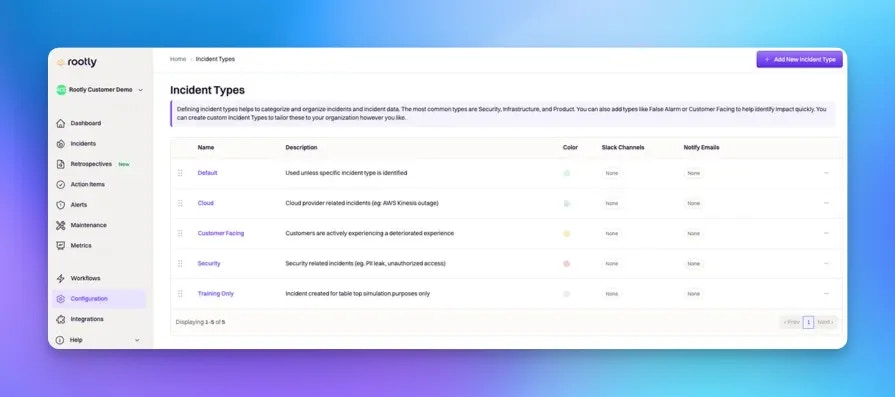 ***
## How Incident Types Are Used
Like Severity, Type is a lever that other Rootly features pull on:
| Feature | How Type is used |
| ------------------------------------------------ | ----------------------------------------------------------------------------------------------------------------------------------------------------------------------------------------------------- |
| **[Workflow conditions](/workflows/conditions)** | Filter workflows so they fire only on specific types. Common patterns: "auto-create a Jira ticket only when Type is 'UI Bug'" or "notify the security team only when Type contains 'Security Event'." |
| **Slack channel + alias notifications** | Each Type can be linked to Slack channels and user groups. Workflows use these to auto-invite the right subject-matter experts (e.g., invite the frontend team on "UI Bug" types). |
| **Notify emails** | Each Type can be linked to email addresses. Useful for stakeholder groups that only care about a specific incident category — e.g., a legal team on "Data Privacy" types. |
| **Retrospective templates** | Different Types can trigger different retrospective templates via workflow — a "Security Event" retrospective covers regulatory reporting, a "UI Bug" retrospective is lightweight. |
| **Metrics + reporting** | Type is a top-level filter in every metrics dashboard. Segmenting MTTR by Type helps you see whether infrastructure issues take longer to resolve than product bugs. |
| **API + Liquid references** | Type is available as `{{ incident.types }}` (names) and `{{ incident.type_ids }}` (IDs) in every workflow template, retrospective template, and API payload. |
Because Type drives so much automation, the shape of your Type taxonomy directly shapes how well your automation targets the right responders — an overly generic Type ("Bug") lands every notification with everyone, while an overly granular one ("iOS Bug on Login Screen") splinters routing until nothing has enough volume to justify its rule.
***
## Choosing a Type Taxonomy
There's no universal Type taxonomy — but there are patterns that work and patterns that don't. Use these to design or audit your team's list.
### How Many Types
Most teams land on **five to ten types**. Fewer than five and Type becomes redundant with Severity (which you already have). More than ten and calibration breaks down — responders default to whichever Type is at the top of the picker.
If you catch yourself creating a Type that answers "who owns this?" — that's what [Teams](/configuration/teams) or [Services](/configuration/services) are for. If you're creating a Type that answers "how bad is this?" — that's [Severity](/configuration/severities). Type is for **what kind of thing is broken**, not who owns it or how urgently.
### Single-Select vs Multi-Select
Type can be configured as **single-select** (one Type per incident) or **multi-select** (multiple Types per incident). Which you choose changes both the picker UX and the workflow conditions available:
* **Single-select** is simpler to reason about. Responders pick one Type; workflows filter with `is` / `is one of`. Best when your Types are mutually exclusive (an incident is a UI Bug or an Infrastructure issue, not both).
* **Multi-select** captures overlapping taxonomies. Responders can tag both "Security Event" and "Data Privacy" on the same incident; workflows filter with `contains any of` / `contains all of`. Best when Types represent aspects rather than exclusive categories.
Most teams start single-select and switch to multi-select only when they hit real overlap. Switching later is fine — historical incidents preserve their existing Type values.
### Common Taxonomies
Focus on the technical shape of the incident.
| Type | When to use |
| --------------------------- | ----------------------------------------------------------------------- |
| **Infrastructure** | Underlying services (databases, network, hosting) failed. |
| **Application Bug** | A code-level bug — regression, unhandled edge case, logic error. |
| **Performance Degradation** | System is up but slow. Not a hard failure. |
| **Third-Party Dependency** | External service (Stripe, Twilio, an SSO provider) is failing. |
| **Deployment Issue** | Caused by a bad release / rollout. Recovery is usually rollback. |
| **Configuration Error** | A settings change (feature flag, config file, DNS) caused the incident. |
| **Security Event** | Actual or potential unauthorized access, exposure, or breach. |
Focus on how the customer experiences the incident.
| Type | When to use |
| ------------------------- | ---------------------------------------------------------------------- |
| **Customer-Facing** | Users directly notice the issue. |
| **Internal-Only** | Employees affected, no customer impact. |
| **Partner / Integration** | Impacts a business partner or B2B integration, not end users. |
| **Data Integrity** | Data loss, corruption, or exposure — often overrides other taxonomies. |
| **Compliance / Legal** | Regulatory or contractual obligations triggered. |
Focus on which product area is broken. Best paired with Multi-Select so cross-product incidents can be tagged with all affected areas.
| Type | When to use |
| ----------------- | ------------------------------------------------------- |
| **Web App** | Browser-facing product. |
| **Mobile App** | iOS / Android apps. |
| **API** | Programmatic surface used by customers or integrations. |
| **Admin Console** | Internal admin tools. |
| **Data Pipeline** | Batch / streaming data infrastructure. |
| **Analytics** | Reporting, dashboards, exports. |
***
## Field Type
Configure Type as either **single-select** or **multi-select** in **Configuration → Incident Types**. The setting affects every incident going forward — historical incidents keep their existing values.
***
## How Incident Types Are Used
Like Severity, Type is a lever that other Rootly features pull on:
| Feature | How Type is used |
| ------------------------------------------------ | ----------------------------------------------------------------------------------------------------------------------------------------------------------------------------------------------------- |
| **[Workflow conditions](/workflows/conditions)** | Filter workflows so they fire only on specific types. Common patterns: "auto-create a Jira ticket only when Type is 'UI Bug'" or "notify the security team only when Type contains 'Security Event'." |
| **Slack channel + alias notifications** | Each Type can be linked to Slack channels and user groups. Workflows use these to auto-invite the right subject-matter experts (e.g., invite the frontend team on "UI Bug" types). |
| **Notify emails** | Each Type can be linked to email addresses. Useful for stakeholder groups that only care about a specific incident category — e.g., a legal team on "Data Privacy" types. |
| **Retrospective templates** | Different Types can trigger different retrospective templates via workflow — a "Security Event" retrospective covers regulatory reporting, a "UI Bug" retrospective is lightweight. |
| **Metrics + reporting** | Type is a top-level filter in every metrics dashboard. Segmenting MTTR by Type helps you see whether infrastructure issues take longer to resolve than product bugs. |
| **API + Liquid references** | Type is available as `{{ incident.types }}` (names) and `{{ incident.type_ids }}` (IDs) in every workflow template, retrospective template, and API payload. |
Because Type drives so much automation, the shape of your Type taxonomy directly shapes how well your automation targets the right responders — an overly generic Type ("Bug") lands every notification with everyone, while an overly granular one ("iOS Bug on Login Screen") splinters routing until nothing has enough volume to justify its rule.
***
## Choosing a Type Taxonomy
There's no universal Type taxonomy — but there are patterns that work and patterns that don't. Use these to design or audit your team's list.
### How Many Types
Most teams land on **five to ten types**. Fewer than five and Type becomes redundant with Severity (which you already have). More than ten and calibration breaks down — responders default to whichever Type is at the top of the picker.
If you catch yourself creating a Type that answers "who owns this?" — that's what [Teams](/configuration/teams) or [Services](/configuration/services) are for. If you're creating a Type that answers "how bad is this?" — that's [Severity](/configuration/severities). Type is for **what kind of thing is broken**, not who owns it or how urgently.
### Single-Select vs Multi-Select
Type can be configured as **single-select** (one Type per incident) or **multi-select** (multiple Types per incident). Which you choose changes both the picker UX and the workflow conditions available:
* **Single-select** is simpler to reason about. Responders pick one Type; workflows filter with `is` / `is one of`. Best when your Types are mutually exclusive (an incident is a UI Bug or an Infrastructure issue, not both).
* **Multi-select** captures overlapping taxonomies. Responders can tag both "Security Event" and "Data Privacy" on the same incident; workflows filter with `contains any of` / `contains all of`. Best when Types represent aspects rather than exclusive categories.
Most teams start single-select and switch to multi-select only when they hit real overlap. Switching later is fine — historical incidents preserve their existing Type values.
### Common Taxonomies
Focus on the technical shape of the incident.
| Type | When to use |
| --------------------------- | ----------------------------------------------------------------------- |
| **Infrastructure** | Underlying services (databases, network, hosting) failed. |
| **Application Bug** | A code-level bug — regression, unhandled edge case, logic error. |
| **Performance Degradation** | System is up but slow. Not a hard failure. |
| **Third-Party Dependency** | External service (Stripe, Twilio, an SSO provider) is failing. |
| **Deployment Issue** | Caused by a bad release / rollout. Recovery is usually rollback. |
| **Configuration Error** | A settings change (feature flag, config file, DNS) caused the incident. |
| **Security Event** | Actual or potential unauthorized access, exposure, or breach. |
Focus on how the customer experiences the incident.
| Type | When to use |
| ------------------------- | ---------------------------------------------------------------------- |
| **Customer-Facing** | Users directly notice the issue. |
| **Internal-Only** | Employees affected, no customer impact. |
| **Partner / Integration** | Impacts a business partner or B2B integration, not end users. |
| **Data Integrity** | Data loss, corruption, or exposure — often overrides other taxonomies. |
| **Compliance / Legal** | Regulatory or contractual obligations triggered. |
Focus on which product area is broken. Best paired with Multi-Select so cross-product incidents can be tagged with all affected areas.
| Type | When to use |
| ----------------- | ------------------------------------------------------- |
| **Web App** | Browser-facing product. |
| **Mobile App** | iOS / Android apps. |
| **API** | Programmatic surface used by customers or integrations. |
| **Admin Console** | Internal admin tools. |
| **Data Pipeline** | Batch / streaming data infrastructure. |
| **Analytics** | Reporting, dashboards, exports. |
***
## Field Type
Configure Type as either **single-select** or **multi-select** in **Configuration → Incident Types**. The setting affects every incident going forward — historical incidents keep their existing values.
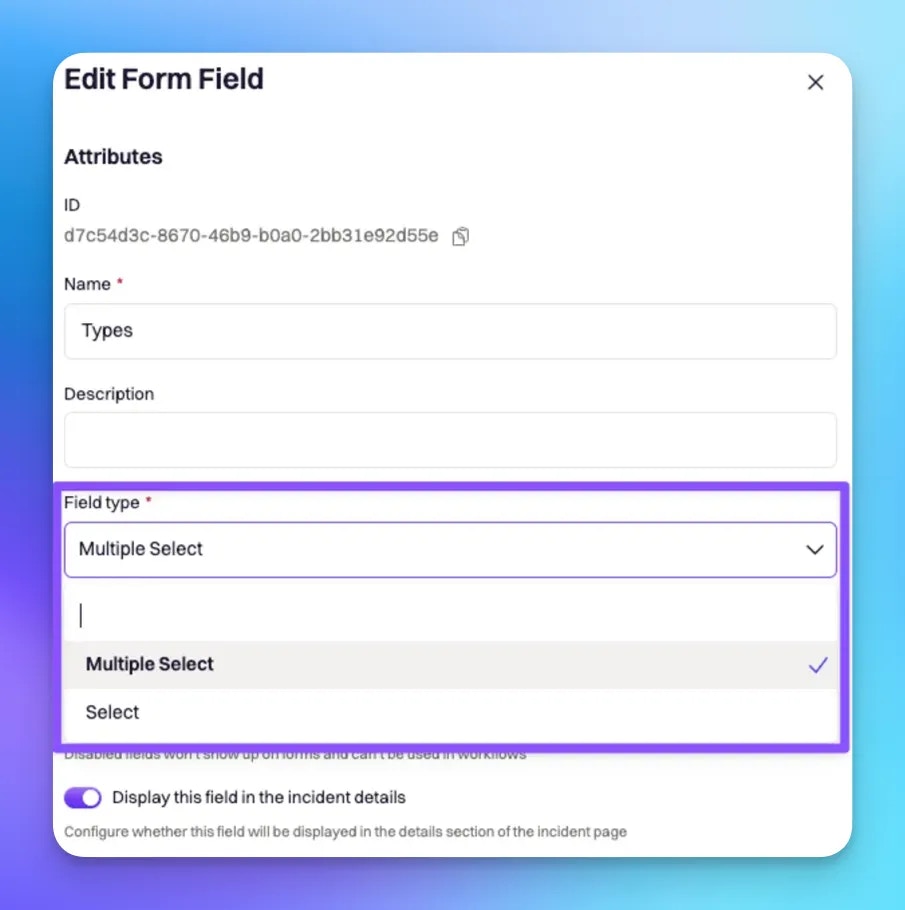 Liquid syntax differs slightly between the two modes. Single-select uses `{{ incident.types | get: '' }}` for the one value. Multi-select uses `{{ incident.raw_types[index] | get: '' }}` where `index` references a specific Type in the list. The attribute reference below covers both.
***
## Configuring Type Attributes
Each Type can be configured with the attributes below. All are available as Liquid variables for use in workflows, retrospective templates, and status page updates.
Unique identifier assigned automatically by Rootly on creation. **Not customizable.** Used in Liquid references and API calls.
```liquid theme={null}
{{ incident.type_ids }}
{{ incident.raw_types | get: 'id' }} {/* single-select */}
{{ incident.raw_types[0] | get: 'id' }} {/* multi-select, first Type */}
```
The display name shown throughout the Rootly UI. Fully customizable — pick names that match your team's operational vocabulary.
```liquid theme={null}
{{ incident.types }}
{{ incident.raw_types | get: 'name' }} {/* single-select */}
{{ incident.raw_types[0] | get: 'name' }} {/* multi-select, first Type */}
```
Auto-generated by lower-casing and hyphenating the name. Used in Liquid references and in workflow condition matches.
**Slugs regenerate when you rename a Type.** Anything referencing the old slug — workflow conditions, saved metrics dashboards, third-party integrations that filter by slug — needs to be updated after a rename.
```liquid theme={null}
{{ incident.type_slugs }}
{{ incident.raw_types | get: 'slug' }}
{{ incident.raw_types[0] | get: 'slug' }}
```
Additional context shown alongside the Type in the UI. Best used to remind responders what qualifies for each Type — e.g., "Any incident affecting customer-facing surfaces (web, mobile, API)."
```liquid theme={null}
{{ incident.raw_types | get: 'description' }}
{{ incident.raw_types[0] | get: 'description' }}
```
Six-digit hex color code used for Type-tinted UI accents and metrics-graph color coding. Pick colors that are meaningful and consistent — reserving red for security-adjacent Types, for example.
```liquid theme={null}
{{ incident.raw_types | get: 'color' }}
{{ incident.raw_types[0] | get: 'color' }}
```
Rootly expects six-digit hex codes (e.g., `#c4231c`). Use a color picker if you're not sure — [color-hex.com](https://www.color-hex.com/) is a common choice.
One or more Slack channels linked to the Type. **Linking alone doesn't post to the channels** — a workflow action (typically "Attached Types Channels") reads this list and performs the notification.
```liquid theme={null}
{{ incident.raw_types | get: 'slack_channels' }}
{{ incident.raw_types[0] | get: 'slack_channels' }}
```
One or more Slack user groups (aka aliases) linked to the Type. **Linking alone doesn't invite users** — a workflow action (typically "Attached Types Aliases") reads this list and performs the invitation.
```liquid theme={null}
{{ incident.raw_types | get: 'slack_aliases' }}
{{ incident.raw_types[0] | get: 'slack_aliases' }}
```
One or more email addresses linked to the Type. **Linking alone doesn't send email** — a workflow action reads this list and sends the notification.
```liquid theme={null}
{{ incident.raw_types | get: 'notify_emails' }}
{{ incident.raw_types[0] | get: 'notify_emails' }}
```
For workflow-driven use, most teams reference the flattened list:
```liquid theme={null}
{{ incident.raw_types | map: 'notify_emails' | flatten | join: ',' }}
```
***
## Best Practices
* **Design Types for automation, not documentation.** If a Type doesn't drive at least one workflow condition, alert routing, or metrics filter, it's just a label. Retire it after 90 days if it never gets used.
* **Keep Type distinct from Team, Service, and Severity.** Type is *what's broken*; Team is *who owns it*; Service is *which component is affected*; Severity is *how bad it is*. Overlapping Types with those dimensions leads to the same data being encoded four times.
* **Start single-select, switch to multi-select when overlap is genuine.** Multi-select is more flexible but harder to filter in workflow conditions (you need `contains any of` instead of `is`). Only take the added complexity when you actually have overlapping taxonomies.
* **Colors should be intuitive.** Reserve red for security / data integrity Types. Use warmer colors (orange, yellow) for customer-facing Types and cooler colors (blue, gray) for internal-only Types. Responders read the color before the label.
* **Attach Slack channels + aliases per Type, but require workflow actions to actually use them.** Same principle as Severities. Keeps notification behavior explicit and auditable.
* **Audit quarterly.** Look at Type usage over the last 90 days. Rare Types (\<5% of incidents) either need a rename to broaden their reach or removal from the picker. Dominant Types (>40%) probably need to be split.
***
## Troubleshooting
Confirm the Type is enabled under Configuration → Incident Types. Archived Types remain visible on historical incidents but don't appear as options on new incidents. If it's enabled and still missing, check whether team-level restrictions are in play — some teams scope which Types their responders can select.
Two common causes: (1) the workflow's condition uses `is` on a multi-select Type field — switch to `contains any of` (see [Workflow Conditions](/workflows/conditions) for the operator reference); (2) the Type slug was regenerated after a rename and the workflow still references the old slug. Rename-triggered slug changes are automatic; update the workflow condition to match the new slug.
Linking Slack channels to a Type doesn't cause auto-invitation on its own — a workflow with an "Attached Types Channels" action is required. Check that a workflow exists, is enabled, and has run conditions that match the Type you're testing. The Type-updated trigger is a good candidate for this workflow.
Working as designed. `{{ incident.types }}` returns a joined string; access individual Types via `{{ incident.raw_types[0] | get: 'name' }}` or iterate with `{% for t in incident.raw_types %}...{% endfor %}` when you need per-Type rendering.
Metrics query by the Type's `slug`, and slugs regenerate on rename. Saved dashboards or reports that filtered by the pre-rename slug won't match anymore. Update the dashboard filter to the new slug, or plan the rename around a natural retention boundary if that filter can't be updated cleanly.
***
## Frequently Asked Questions
Most teams land on 5-10. Fewer and Type becomes redundant with Severity. More and calibration breaks down (responders default to whichever Type is at the top of the picker). See Choosing a Type Taxonomy above for detail.
**Kind** is a fixed, system-defined property that controls structural behavior (test vs normal, backfill vs scheduled maintenance, etc.). **Type** is a customer-defined categorical property for your organization's taxonomy. Kind is set once at creation and is immutable; Type can be changed anytime. See [Incident Kind](/configuration/incident-kind) for the full Kind reference.
Yes. Type is fully mutable — change it via the incident details page or a workflow action. Changes are logged in the incident timeline. This is different from Kind, which is immutable after declaration.
Yes — Types belong to a Team. Each team maintains its own Type list, and the picker on an incident form shows the Types defined for that incident's team. If your workspace uses multiple teams, define the Types each team actually uses; there's no single org-wide Type list.
Historical incidents keep the Type value they were created with, even after the Type is deleted from the picker. Only new incidents lose access to the removed Type. For matrix overhauls, archive rather than delete so historical data stays readable.
Yes. Type is one of the most common fields used in workflow run conditions. See [Workflow Conditions](/workflows/conditions) for the operator reference — Type is often used with `contains any of` in multi-select mode.
No. Test incidents (declared via `/rootly test`) are excluded from production metrics regardless of Type. This is a Kind-level behavior; see [Incident Kind](/configuration/incident-kind) for the full exclusion matrix.
***
## Related Pages
The fixed counterpart — governs structural incident behavior. Read this to disambiguate Kind from Type.
The other most-used incident property. Type and Severity are the two dimensions most workflows filter on.
Use Type in workflow run conditions to route different incident categories to different response processes.
Liquid syntax differs slightly between the two modes. Single-select uses `{{ incident.types | get: '' }}` for the one value. Multi-select uses `{{ incident.raw_types[index] | get: '' }}` where `index` references a specific Type in the list. The attribute reference below covers both.
***
## Configuring Type Attributes
Each Type can be configured with the attributes below. All are available as Liquid variables for use in workflows, retrospective templates, and status page updates.
Unique identifier assigned automatically by Rootly on creation. **Not customizable.** Used in Liquid references and API calls.
```liquid theme={null}
{{ incident.type_ids }}
{{ incident.raw_types | get: 'id' }} {/* single-select */}
{{ incident.raw_types[0] | get: 'id' }} {/* multi-select, first Type */}
```
The display name shown throughout the Rootly UI. Fully customizable — pick names that match your team's operational vocabulary.
```liquid theme={null}
{{ incident.types }}
{{ incident.raw_types | get: 'name' }} {/* single-select */}
{{ incident.raw_types[0] | get: 'name' }} {/* multi-select, first Type */}
```
Auto-generated by lower-casing and hyphenating the name. Used in Liquid references and in workflow condition matches.
**Slugs regenerate when you rename a Type.** Anything referencing the old slug — workflow conditions, saved metrics dashboards, third-party integrations that filter by slug — needs to be updated after a rename.
```liquid theme={null}
{{ incident.type_slugs }}
{{ incident.raw_types | get: 'slug' }}
{{ incident.raw_types[0] | get: 'slug' }}
```
Additional context shown alongside the Type in the UI. Best used to remind responders what qualifies for each Type — e.g., "Any incident affecting customer-facing surfaces (web, mobile, API)."
```liquid theme={null}
{{ incident.raw_types | get: 'description' }}
{{ incident.raw_types[0] | get: 'description' }}
```
Six-digit hex color code used for Type-tinted UI accents and metrics-graph color coding. Pick colors that are meaningful and consistent — reserving red for security-adjacent Types, for example.
```liquid theme={null}
{{ incident.raw_types | get: 'color' }}
{{ incident.raw_types[0] | get: 'color' }}
```
Rootly expects six-digit hex codes (e.g., `#c4231c`). Use a color picker if you're not sure — [color-hex.com](https://www.color-hex.com/) is a common choice.
One or more Slack channels linked to the Type. **Linking alone doesn't post to the channels** — a workflow action (typically "Attached Types Channels") reads this list and performs the notification.
```liquid theme={null}
{{ incident.raw_types | get: 'slack_channels' }}
{{ incident.raw_types[0] | get: 'slack_channels' }}
```
One or more Slack user groups (aka aliases) linked to the Type. **Linking alone doesn't invite users** — a workflow action (typically "Attached Types Aliases") reads this list and performs the invitation.
```liquid theme={null}
{{ incident.raw_types | get: 'slack_aliases' }}
{{ incident.raw_types[0] | get: 'slack_aliases' }}
```
One or more email addresses linked to the Type. **Linking alone doesn't send email** — a workflow action reads this list and sends the notification.
```liquid theme={null}
{{ incident.raw_types | get: 'notify_emails' }}
{{ incident.raw_types[0] | get: 'notify_emails' }}
```
For workflow-driven use, most teams reference the flattened list:
```liquid theme={null}
{{ incident.raw_types | map: 'notify_emails' | flatten | join: ',' }}
```
***
## Best Practices
* **Design Types for automation, not documentation.** If a Type doesn't drive at least one workflow condition, alert routing, or metrics filter, it's just a label. Retire it after 90 days if it never gets used.
* **Keep Type distinct from Team, Service, and Severity.** Type is *what's broken*; Team is *who owns it*; Service is *which component is affected*; Severity is *how bad it is*. Overlapping Types with those dimensions leads to the same data being encoded four times.
* **Start single-select, switch to multi-select when overlap is genuine.** Multi-select is more flexible but harder to filter in workflow conditions (you need `contains any of` instead of `is`). Only take the added complexity when you actually have overlapping taxonomies.
* **Colors should be intuitive.** Reserve red for security / data integrity Types. Use warmer colors (orange, yellow) for customer-facing Types and cooler colors (blue, gray) for internal-only Types. Responders read the color before the label.
* **Attach Slack channels + aliases per Type, but require workflow actions to actually use them.** Same principle as Severities. Keeps notification behavior explicit and auditable.
* **Audit quarterly.** Look at Type usage over the last 90 days. Rare Types (\<5% of incidents) either need a rename to broaden their reach or removal from the picker. Dominant Types (>40%) probably need to be split.
***
## Troubleshooting
Confirm the Type is enabled under Configuration → Incident Types. Archived Types remain visible on historical incidents but don't appear as options on new incidents. If it's enabled and still missing, check whether team-level restrictions are in play — some teams scope which Types their responders can select.
Two common causes: (1) the workflow's condition uses `is` on a multi-select Type field — switch to `contains any of` (see [Workflow Conditions](/workflows/conditions) for the operator reference); (2) the Type slug was regenerated after a rename and the workflow still references the old slug. Rename-triggered slug changes are automatic; update the workflow condition to match the new slug.
Linking Slack channels to a Type doesn't cause auto-invitation on its own — a workflow with an "Attached Types Channels" action is required. Check that a workflow exists, is enabled, and has run conditions that match the Type you're testing. The Type-updated trigger is a good candidate for this workflow.
Working as designed. `{{ incident.types }}` returns a joined string; access individual Types via `{{ incident.raw_types[0] | get: 'name' }}` or iterate with `{% for t in incident.raw_types %}...{% endfor %}` when you need per-Type rendering.
Metrics query by the Type's `slug`, and slugs regenerate on rename. Saved dashboards or reports that filtered by the pre-rename slug won't match anymore. Update the dashboard filter to the new slug, or plan the rename around a natural retention boundary if that filter can't be updated cleanly.
***
## Frequently Asked Questions
Most teams land on 5-10. Fewer and Type becomes redundant with Severity. More and calibration breaks down (responders default to whichever Type is at the top of the picker). See Choosing a Type Taxonomy above for detail.
**Kind** is a fixed, system-defined property that controls structural behavior (test vs normal, backfill vs scheduled maintenance, etc.). **Type** is a customer-defined categorical property for your organization's taxonomy. Kind is set once at creation and is immutable; Type can be changed anytime. See [Incident Kind](/configuration/incident-kind) for the full Kind reference.
Yes. Type is fully mutable — change it via the incident details page or a workflow action. Changes are logged in the incident timeline. This is different from Kind, which is immutable after declaration.
Yes — Types belong to a Team. Each team maintains its own Type list, and the picker on an incident form shows the Types defined for that incident's team. If your workspace uses multiple teams, define the Types each team actually uses; there's no single org-wide Type list.
Historical incidents keep the Type value they were created with, even after the Type is deleted from the picker. Only new incidents lose access to the removed Type. For matrix overhauls, archive rather than delete so historical data stays readable.
Yes. Type is one of the most common fields used in workflow run conditions. See [Workflow Conditions](/workflows/conditions) for the operator reference — Type is often used with `contains any of` in multi-select mode.
No. Test incidents (declared via `/rootly test`) are excluded from production metrics regardless of Type. This is a Kind-level behavior; see [Incident Kind](/configuration/incident-kind) for the full exclusion matrix.
***
## Related Pages
The fixed counterpart — governs structural incident behavior. Read this to disambiguate Kind from Type.
The other most-used incident property. Type and Severity are the two dimensions most workflows filter on.
Use Type in workflow run conditions to route different incident categories to different response processes.