> ## Documentation Index
> Fetch the complete documentation index at: https://docs.rootly.com/llms.txt
> Use this file to discover all available pages before exploring further.
# Incident Causes
> Track root causes across incidents to surface systemic patterns, prioritize reliability work, and give retrospectives a shared, customizable vocabulary.
## Overview
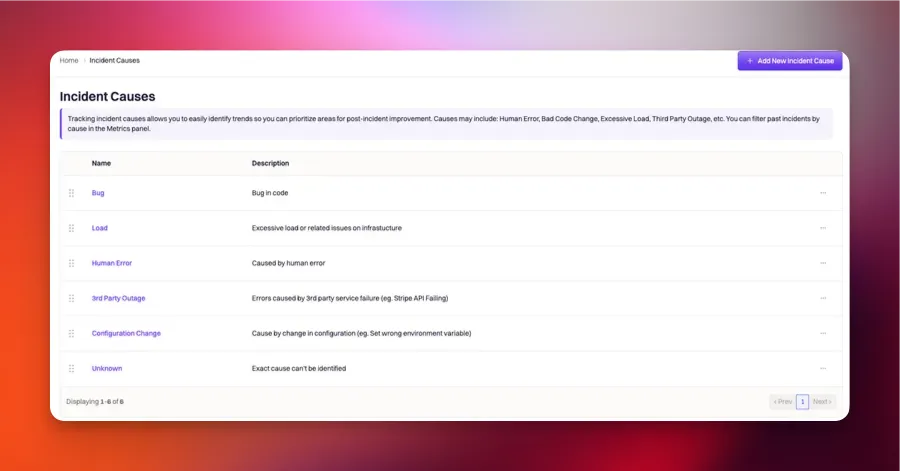
**Incident Causes** are the shared vocabulary your team uses to describe *why* an incident happened. Where [Severity](/configuration/severities) captures how bad an incident was and [Types](/configuration/incident-types) captures what category it fell into, Causes capture the underlying failure mode — `Third-party outage`, `Configuration drift`, `Deployment regression`, `Insufficient monitoring`.
Causes are the field most retrospectives circle back to. Their real value shows up over the long term: three months of tagged Causes reveals whether your team is losing time to the same failure modes repeatedly, and gives reliability planning something concrete to point at.
 ***
## How Incident Causes Are Used
Unlike Severity or Environment (set at incident creation), Causes are typically populated **during the retrospective process** — after mitigation, when the responding team has enough evidence to say what actually went wrong. The field is a multi-select because most real incidents have more than one contributing cause.
| Feature | How Causes are used |
| ------------------------------------------------ | ------------------------------------------------------------------------------------------------------------------------------------------------------------------------------------------------------- |
| **Retrospective form** | The Causes field is added to the [Incident Retrospective Form](/configuration/built-in-forms) so responders pick Causes during the Gather & Confirm Data step. This is where most Causes get set. |
| **Metrics + reporting** | Causes surface as a top-level filter in metrics dashboards. "Causes over the last 90 days" is one of the most-referenced reliability planning reports. |
| **[Workflow conditions](/workflows/conditions)** | Filter workflows on Cause. Common patterns: auto-add a specific responder team when `Third-party outage` is tagged, or trigger a supplemental review workflow when `Insufficient monitoring` is tagged. |
| **Retrospective templates** | Reference Causes in template Liquid — e.g., a `{% if incident.causes contains 'Data integrity' %}` block that expands into a data-loss impact section. |
| **API + Liquid references** | Causes are available as `{{ incident.causes }}` (names) and `{{ incident.cause_ids }}` (IDs) in workflow templates, retrospective templates, and API payloads. |
Because Causes are the primary input to reliability planning, **the shape of your Cause list directly shapes what your team can improve on**. An overly generic list (`Bug`, `Human Error`) hides the actual failure modes; an overly granular one (`OAuth expiry on service X`) splinters data across too many buckets to see patterns.
***
## Choosing Your Cause Taxonomy
Causes should describe **failure modes**, not incidents. The distinction matters — "Payment API returned 500s" is an incident description; `Third-party outage` and `Insufficient retry logic` are causes.
### How Many Causes
Most teams land on **8–15 causes**. Fewer and everything collapses into `Other`. More and the causes stop being meaningfully different — responders default to the top-of-picker choices, and metrics lose signal.
If a Cause hasn't been used in 90 days, retire it. If a single Cause accounts for more than 25% of incidents over 90 days, it's probably too broad and needs to be split.
### Common Cause Categories
Causes that describe how systems broke, regardless of what the trigger was.
| Cause | When to use |
| ------------------------- | ------------------------------------------------------------------------------------------------------------------------------ |
| **Third-party outage** | An external service (Stripe, Twilio, an SSO provider, a cloud provider) failed and cascaded. |
| **Deployment regression** | A recent release caused the incident. Recovery usually involves rollback. |
| **Configuration drift** | A settings change (feature flag, DNS, environment variable) caused the incident. Often intentional, unintentionally impactful. |
| **Capacity / scaling** | Traffic or workload exceeded provisioned capacity — auto-scaling failed to keep up, or wasn't configured. |
| **Data integrity** | Data loss, corruption, or unintended exposure occurred. Almost always warrants a dedicated retrospective section. |
| **Race condition** | Concurrent operations produced a wrong result. Hard to reproduce, easy to hand-wave, tag explicitly so you can track. |
Causes that describe what your team could have done differently before the incident.
| Cause | When to use |
| --------------------------- | ------------------------------------------------------------------------------------------------------------------------------------- |
| **Insufficient monitoring** | The team didn't know something was broken until a customer reported it. |
| **Insufficient alerting** | Monitors existed, but nobody was paged in time. Threshold too high, wrong severity, alert going to a stale channel. |
| **Runbook gap** | The responder didn't have documented steps for this scenario. Add to the retrospective's action items. |
| **Test coverage gap** | Code that broke wasn't covered by tests that would have caught the failure mode. |
| **Change management** | A change was rolled out without proper review, review didn't catch the issue, or rollout process didn't include a safe rollback path. |
Causes that describe factors outside the team's direct control.
| Cause | When to use |
| -------------------------------------- | -------------------------------------------------------------------------------------------------------------------------------------------- |
| **Vendor incident** | Different from third-party outage — this is a vendor-side bug or change that impacted your system, not just their infrastructure being down. |
| **Regulatory / compliance change** | An external requirement changed, and your systems weren't updated in time. |
| **User-triggered / expected behavior** | The incident wasn't a bug — a customer's usage pattern crossed a threshold that should have been documented or bounded. |
***
## Creating Incident Causes
Manage Causes from **Configuration → Incident Causes** in the Rootly dashboard sidebar. (The Catalogs section is for service/component catalogs from tools like Backstage and Cortex — it does not create incident causes.)
In the Rootly sidebar, navigate to **Configuration → Incident Causes**. The page lists every cause already defined for your organization.
Click **Add New** (or the equivalent create button at the top of the list). Fill in:
* **Name** — the display label that responders see on the incident form (e.g., `Database deadlock`, `Third-party outage`, `Deployment regression`).
* **Description** — optional context shown when the cause is selected. Best used to disambiguate similar-sounding causes.
* **Color** — optional visual tag for dashboards and reports.
The **Slug** is generated automatically from the Name by lower-casing and hyphenating — used in Liquid references and the API.
Click **Save**. The new cause becomes immediately available as an option on the incident form's **Causes** multi-select field for all team members.
Causes are multi-select per incident — responders can attach more than one cause when the root cause is genuinely shared between failure modes (e.g., `Third-party outage` and `Insufficient monitoring`). Keep the list short and orthogonal to encourage selection rather than freeform notes.
***
## Field Type
**Incident Causes** is a **multi-select** field type only. Every incident can have zero, one, or many causes attached — reflecting the reality that most incidents have multiple contributing factors.
***
## Configuring Cause Attributes
Each Cause can be configured with the attributes below. All are available in Liquid syntax for use in workflows, retrospective templates, and status page updates.
Unique identifier assigned automatically by Rootly on creation. **Not customizable.** Used in Liquid references and API calls.
```liquid theme={null}
{{ incident.cause_ids }}
{%- comment -%} first cause {%- endcomment -%}
{{ incident.raw_causes[0] | get: 'id' }}
```
The display name shown throughout the Rootly UI. Fully customizable — pick names that describe failure modes, not incident descriptions.
```liquid theme={null}
{{ incident.causes }}
{{ incident.raw_causes[0] | get: 'name' }}
```
Auto-generated by lower-casing and hyphenating the name. Used in Liquid references and stable across name changes.
```liquid theme={null}
{{ incident.cause_slugs }}
{{ incident.raw_causes[0] | get: 'slug' }}
```
Additional context shown alongside the Cause in the UI. Best used to disambiguate similar-sounding Causes — e.g., "Third-party outage: use when the external service itself is down. Use Vendor incident for cases where the vendor is up but their code introduced a bug in your system."
```liquid theme={null}
{{ incident.raw_causes[0] | get: 'description' }}
```
Six-digit hex color code used for Cause-tinted UI accents and metrics-graph color coding. Group related causes with similar shades (e.g., all "system" causes in blue, all "process" causes in orange).
```liquid theme={null}
{{ incident.raw_causes[0] | get: 'color' }}
```
Rootly expects six-digit hex codes (e.g., `#c4231c`). Use a color picker if you're not sure — [color-hex.com](https://www.color-hex.com/) is a common choice.
Iterating over all Causes on an incident (for a Liquid template in a retrospective or workflow message):
```liquid theme={null}
{% for cause in incident.raw_causes %}
- {{ cause.name }}: {{ cause.description }}
{% endfor %}
```
***
## Best Practices
* **Populate Causes during the retrospective, not at incident creation.** At creation time you don't know what caused the incident — you know a symptom. Wait until mitigation is done and the responding team has enough evidence to attach real causes.
* **Design Causes to describe failure modes.** `Payment API returned 500s` is an incident description; `Third-party outage` and `Insufficient retry logic` are causes. The rewrite test: if the Cause could describe two different incidents in the same category, it's a good failure-mode Cause.
* **Encourage multi-select.** Most real incidents have more than one cause. A single-cause tagging pattern usually means responders are collapsing complex root causes into whichever tag is dominant, which loses signal.
* **Keep the list short and orthogonal.** Aim for 8–15 causes. If two Causes overlap conceptually (e.g., `Deploy failure` and `Deployment regression`), merge them. If a Cause hasn't been used in 90 days, archive it.
* **Retire and split based on data.** Every quarter, look at Cause frequency. Rare Causes (\<5% of incidents) get archived; dominant Causes (>25% of incidents) get split into more specific failure modes.
* **Pair Causes with action items.** Cause tagging without follow-up work isn't reliability improvement — it's data collection. Each recurring Cause should have at least one open action item aimed at reducing its frequency.
***
## Troubleshooting
Confirm the Cause is enabled under Configuration → Incident Causes. Archived Causes remain visible on historical incidents but don't appear as options on new incidents. Also check whether team-level restrictions are in play — some teams scope which Causes their responders can select.
Two common causes: (1) responders are defaulting to a single Cause because the list is too long or badly ordered — reorder so most-common Causes are at the top; (2) responders aren't populating Causes at all because the field isn't on the retrospective flow. Add the Causes field to the [Incident Retrospective Form](/configuration/built-in-forms) so it appears in the Gather & Confirm Data step.
Metrics queries filter by the Cause `slug`, not name. Renaming a Cause keeps the slug stable, so historical incidents remain grouped correctly. If a report is grouping incorrectly after a rename, refresh the dashboard cache — some reports lag one query cycle after configuration changes.
The workflow's trigger needs to be **Causes Added** (or **Causes Updated**), and the run conditions need to reference the specific Cause you're tagging. See [Workflow Conditions](/workflows/conditions) for the operator reference — Causes is a multi-select field, so use `contains any of`, not `is`.
They shouldn't. Deleting a Cause keeps the historical association intact on incidents that had it tagged; the Cause name just won't render on the current UI (it appears as archived). If you're seeing Causes disappear entirely from historical incidents, contact support — that's not expected behavior.
***
## Frequently Asked Questions
**Type** captures *what kind of thing* the incident is — UI Bug, Infrastructure, Security Event. **Cause** captures *why the incident happened* — Third-party outage, Configuration drift, Insufficient monitoring. Type is usually set at incident creation; Cause is usually set during the retrospective. See [Incident Types](/configuration/incident-types) for the Type reference.
After. During an active incident, responders don't yet know what caused the issue — they know symptoms. Wait until mitigation is done and the responding team has enough evidence. Most teams populate Causes as part of the retrospective template.
Most teams land on 8–15. Fewer and everything collapses into `Other`. More and the causes stop being meaningfully different in practice. Audit quarterly and archive rare Causes (\<5% usage).
Yes. Causes can be added programmatically via the incident update API and by workflow actions (Update Incident action → set Causes). This is useful for auto-tagging based on integration data — e.g., automatically add `Third-party outage` when a specific external monitor triggered the incident.
The Causes list is org-wide, but teams can restrict which Causes their responders can select. A shared Cause list with team-specific defaults is usually cleaner than maintaining separate lists per team.
No. Test incidents (declared via `/rootly test`) are excluded from production metrics regardless of Cause. This is a Kind-level behavior; see [Incident Kind](/configuration/incident-kind) for the full exclusion matrix.
Yes. Add the Causes field to the [Incident Retrospective Form](/configuration/built-in-forms) and mark it required. Since the form runs during the Gather & Confirm Data step, the retrospective can't advance past that step without at least one Cause selected.
***
## Related Pages
Where most Causes get populated. The retrospective template is your primary Cause-collection surface.
Use Causes in workflow conditions to trigger auto-responses (add responder team, spawn action items) when specific failure modes are tagged.
The what-kind-of-incident field, distinct from Cause (why-it-happened). Read this to disambiguate the two.
***
## How Incident Causes Are Used
Unlike Severity or Environment (set at incident creation), Causes are typically populated **during the retrospective process** — after mitigation, when the responding team has enough evidence to say what actually went wrong. The field is a multi-select because most real incidents have more than one contributing cause.
| Feature | How Causes are used |
| ------------------------------------------------ | ------------------------------------------------------------------------------------------------------------------------------------------------------------------------------------------------------- |
| **Retrospective form** | The Causes field is added to the [Incident Retrospective Form](/configuration/built-in-forms) so responders pick Causes during the Gather & Confirm Data step. This is where most Causes get set. |
| **Metrics + reporting** | Causes surface as a top-level filter in metrics dashboards. "Causes over the last 90 days" is one of the most-referenced reliability planning reports. |
| **[Workflow conditions](/workflows/conditions)** | Filter workflows on Cause. Common patterns: auto-add a specific responder team when `Third-party outage` is tagged, or trigger a supplemental review workflow when `Insufficient monitoring` is tagged. |
| **Retrospective templates** | Reference Causes in template Liquid — e.g., a `{% if incident.causes contains 'Data integrity' %}` block that expands into a data-loss impact section. |
| **API + Liquid references** | Causes are available as `{{ incident.causes }}` (names) and `{{ incident.cause_ids }}` (IDs) in workflow templates, retrospective templates, and API payloads. |
Because Causes are the primary input to reliability planning, **the shape of your Cause list directly shapes what your team can improve on**. An overly generic list (`Bug`, `Human Error`) hides the actual failure modes; an overly granular one (`OAuth expiry on service X`) splinters data across too many buckets to see patterns.
***
## Choosing Your Cause Taxonomy
Causes should describe **failure modes**, not incidents. The distinction matters — "Payment API returned 500s" is an incident description; `Third-party outage` and `Insufficient retry logic` are causes.
### How Many Causes
Most teams land on **8–15 causes**. Fewer and everything collapses into `Other`. More and the causes stop being meaningfully different — responders default to the top-of-picker choices, and metrics lose signal.
If a Cause hasn't been used in 90 days, retire it. If a single Cause accounts for more than 25% of incidents over 90 days, it's probably too broad and needs to be split.
### Common Cause Categories
Causes that describe how systems broke, regardless of what the trigger was.
| Cause | When to use |
| ------------------------- | ------------------------------------------------------------------------------------------------------------------------------ |
| **Third-party outage** | An external service (Stripe, Twilio, an SSO provider, a cloud provider) failed and cascaded. |
| **Deployment regression** | A recent release caused the incident. Recovery usually involves rollback. |
| **Configuration drift** | A settings change (feature flag, DNS, environment variable) caused the incident. Often intentional, unintentionally impactful. |
| **Capacity / scaling** | Traffic or workload exceeded provisioned capacity — auto-scaling failed to keep up, or wasn't configured. |
| **Data integrity** | Data loss, corruption, or unintended exposure occurred. Almost always warrants a dedicated retrospective section. |
| **Race condition** | Concurrent operations produced a wrong result. Hard to reproduce, easy to hand-wave, tag explicitly so you can track. |
Causes that describe what your team could have done differently before the incident.
| Cause | When to use |
| --------------------------- | ------------------------------------------------------------------------------------------------------------------------------------- |
| **Insufficient monitoring** | The team didn't know something was broken until a customer reported it. |
| **Insufficient alerting** | Monitors existed, but nobody was paged in time. Threshold too high, wrong severity, alert going to a stale channel. |
| **Runbook gap** | The responder didn't have documented steps for this scenario. Add to the retrospective's action items. |
| **Test coverage gap** | Code that broke wasn't covered by tests that would have caught the failure mode. |
| **Change management** | A change was rolled out without proper review, review didn't catch the issue, or rollout process didn't include a safe rollback path. |
Causes that describe factors outside the team's direct control.
| Cause | When to use |
| -------------------------------------- | -------------------------------------------------------------------------------------------------------------------------------------------- |
| **Vendor incident** | Different from third-party outage — this is a vendor-side bug or change that impacted your system, not just their infrastructure being down. |
| **Regulatory / compliance change** | An external requirement changed, and your systems weren't updated in time. |
| **User-triggered / expected behavior** | The incident wasn't a bug — a customer's usage pattern crossed a threshold that should have been documented or bounded. |
***
## Creating Incident Causes
Manage Causes from **Configuration → Incident Causes** in the Rootly dashboard sidebar. (The Catalogs section is for service/component catalogs from tools like Backstage and Cortex — it does not create incident causes.)
In the Rootly sidebar, navigate to **Configuration → Incident Causes**. The page lists every cause already defined for your organization.
Click **Add New** (or the equivalent create button at the top of the list). Fill in:
* **Name** — the display label that responders see on the incident form (e.g., `Database deadlock`, `Third-party outage`, `Deployment regression`).
* **Description** — optional context shown when the cause is selected. Best used to disambiguate similar-sounding causes.
* **Color** — optional visual tag for dashboards and reports.
The **Slug** is generated automatically from the Name by lower-casing and hyphenating — used in Liquid references and the API.
Click **Save**. The new cause becomes immediately available as an option on the incident form's **Causes** multi-select field for all team members.
Causes are multi-select per incident — responders can attach more than one cause when the root cause is genuinely shared between failure modes (e.g., `Third-party outage` and `Insufficient monitoring`). Keep the list short and orthogonal to encourage selection rather than freeform notes.
***
## Field Type
**Incident Causes** is a **multi-select** field type only. Every incident can have zero, one, or many causes attached — reflecting the reality that most incidents have multiple contributing factors.
***
## Configuring Cause Attributes
Each Cause can be configured with the attributes below. All are available in Liquid syntax for use in workflows, retrospective templates, and status page updates.
Unique identifier assigned automatically by Rootly on creation. **Not customizable.** Used in Liquid references and API calls.
```liquid theme={null}
{{ incident.cause_ids }}
{%- comment -%} first cause {%- endcomment -%}
{{ incident.raw_causes[0] | get: 'id' }}
```
The display name shown throughout the Rootly UI. Fully customizable — pick names that describe failure modes, not incident descriptions.
```liquid theme={null}
{{ incident.causes }}
{{ incident.raw_causes[0] | get: 'name' }}
```
Auto-generated by lower-casing and hyphenating the name. Used in Liquid references and stable across name changes.
```liquid theme={null}
{{ incident.cause_slugs }}
{{ incident.raw_causes[0] | get: 'slug' }}
```
Additional context shown alongside the Cause in the UI. Best used to disambiguate similar-sounding Causes — e.g., "Third-party outage: use when the external service itself is down. Use Vendor incident for cases where the vendor is up but their code introduced a bug in your system."
```liquid theme={null}
{{ incident.raw_causes[0] | get: 'description' }}
```
Six-digit hex color code used for Cause-tinted UI accents and metrics-graph color coding. Group related causes with similar shades (e.g., all "system" causes in blue, all "process" causes in orange).
```liquid theme={null}
{{ incident.raw_causes[0] | get: 'color' }}
```
Rootly expects six-digit hex codes (e.g., `#c4231c`). Use a color picker if you're not sure — [color-hex.com](https://www.color-hex.com/) is a common choice.
Iterating over all Causes on an incident (for a Liquid template in a retrospective or workflow message):
```liquid theme={null}
{% for cause in incident.raw_causes %}
- {{ cause.name }}: {{ cause.description }}
{% endfor %}
```
***
## Best Practices
* **Populate Causes during the retrospective, not at incident creation.** At creation time you don't know what caused the incident — you know a symptom. Wait until mitigation is done and the responding team has enough evidence to attach real causes.
* **Design Causes to describe failure modes.** `Payment API returned 500s` is an incident description; `Third-party outage` and `Insufficient retry logic` are causes. The rewrite test: if the Cause could describe two different incidents in the same category, it's a good failure-mode Cause.
* **Encourage multi-select.** Most real incidents have more than one cause. A single-cause tagging pattern usually means responders are collapsing complex root causes into whichever tag is dominant, which loses signal.
* **Keep the list short and orthogonal.** Aim for 8–15 causes. If two Causes overlap conceptually (e.g., `Deploy failure` and `Deployment regression`), merge them. If a Cause hasn't been used in 90 days, archive it.
* **Retire and split based on data.** Every quarter, look at Cause frequency. Rare Causes (\<5% of incidents) get archived; dominant Causes (>25% of incidents) get split into more specific failure modes.
* **Pair Causes with action items.** Cause tagging without follow-up work isn't reliability improvement — it's data collection. Each recurring Cause should have at least one open action item aimed at reducing its frequency.
***
## Troubleshooting
Confirm the Cause is enabled under Configuration → Incident Causes. Archived Causes remain visible on historical incidents but don't appear as options on new incidents. Also check whether team-level restrictions are in play — some teams scope which Causes their responders can select.
Two common causes: (1) responders are defaulting to a single Cause because the list is too long or badly ordered — reorder so most-common Causes are at the top; (2) responders aren't populating Causes at all because the field isn't on the retrospective flow. Add the Causes field to the [Incident Retrospective Form](/configuration/built-in-forms) so it appears in the Gather & Confirm Data step.
Metrics queries filter by the Cause `slug`, not name. Renaming a Cause keeps the slug stable, so historical incidents remain grouped correctly. If a report is grouping incorrectly after a rename, refresh the dashboard cache — some reports lag one query cycle after configuration changes.
The workflow's trigger needs to be **Causes Added** (or **Causes Updated**), and the run conditions need to reference the specific Cause you're tagging. See [Workflow Conditions](/workflows/conditions) for the operator reference — Causes is a multi-select field, so use `contains any of`, not `is`.
They shouldn't. Deleting a Cause keeps the historical association intact on incidents that had it tagged; the Cause name just won't render on the current UI (it appears as archived). If you're seeing Causes disappear entirely from historical incidents, contact support — that's not expected behavior.
***
## Frequently Asked Questions
**Type** captures *what kind of thing* the incident is — UI Bug, Infrastructure, Security Event. **Cause** captures *why the incident happened* — Third-party outage, Configuration drift, Insufficient monitoring. Type is usually set at incident creation; Cause is usually set during the retrospective. See [Incident Types](/configuration/incident-types) for the Type reference.
After. During an active incident, responders don't yet know what caused the issue — they know symptoms. Wait until mitigation is done and the responding team has enough evidence. Most teams populate Causes as part of the retrospective template.
Most teams land on 8–15. Fewer and everything collapses into `Other`. More and the causes stop being meaningfully different in practice. Audit quarterly and archive rare Causes (\<5% usage).
Yes. Causes can be added programmatically via the incident update API and by workflow actions (Update Incident action → set Causes). This is useful for auto-tagging based on integration data — e.g., automatically add `Third-party outage` when a specific external monitor triggered the incident.
The Causes list is org-wide, but teams can restrict which Causes their responders can select. A shared Cause list with team-specific defaults is usually cleaner than maintaining separate lists per team.
No. Test incidents (declared via `/rootly test`) are excluded from production metrics regardless of Cause. This is a Kind-level behavior; see [Incident Kind](/configuration/incident-kind) for the full exclusion matrix.
Yes. Add the Causes field to the [Incident Retrospective Form](/configuration/built-in-forms) and mark it required. Since the form runs during the Gather & Confirm Data step, the retrospective can't advance past that step without at least one Cause selected.
***
## Related Pages
Where most Causes get populated. The retrospective template is your primary Cause-collection surface.
Use Causes in workflow conditions to trigger auto-responses (add responder team, spawn action items) when specific failure modes are tagged.
The what-kind-of-incident field, distinct from Cause (why-it-happened). Read this to disambiguate the two.