> ## Documentation Index
> Fetch the complete documentation index at: https://docs.rootly.com/llms.txt
> Use this file to discover all available pages before exploring further.
# Related Incidents
> Rootly AI ranks past incidents that match the one you are running, grounded in your team's own history, and surfaces them in the Slack incident channel.
## Overview
Rootly AI matches your incident against everything your team already solved.
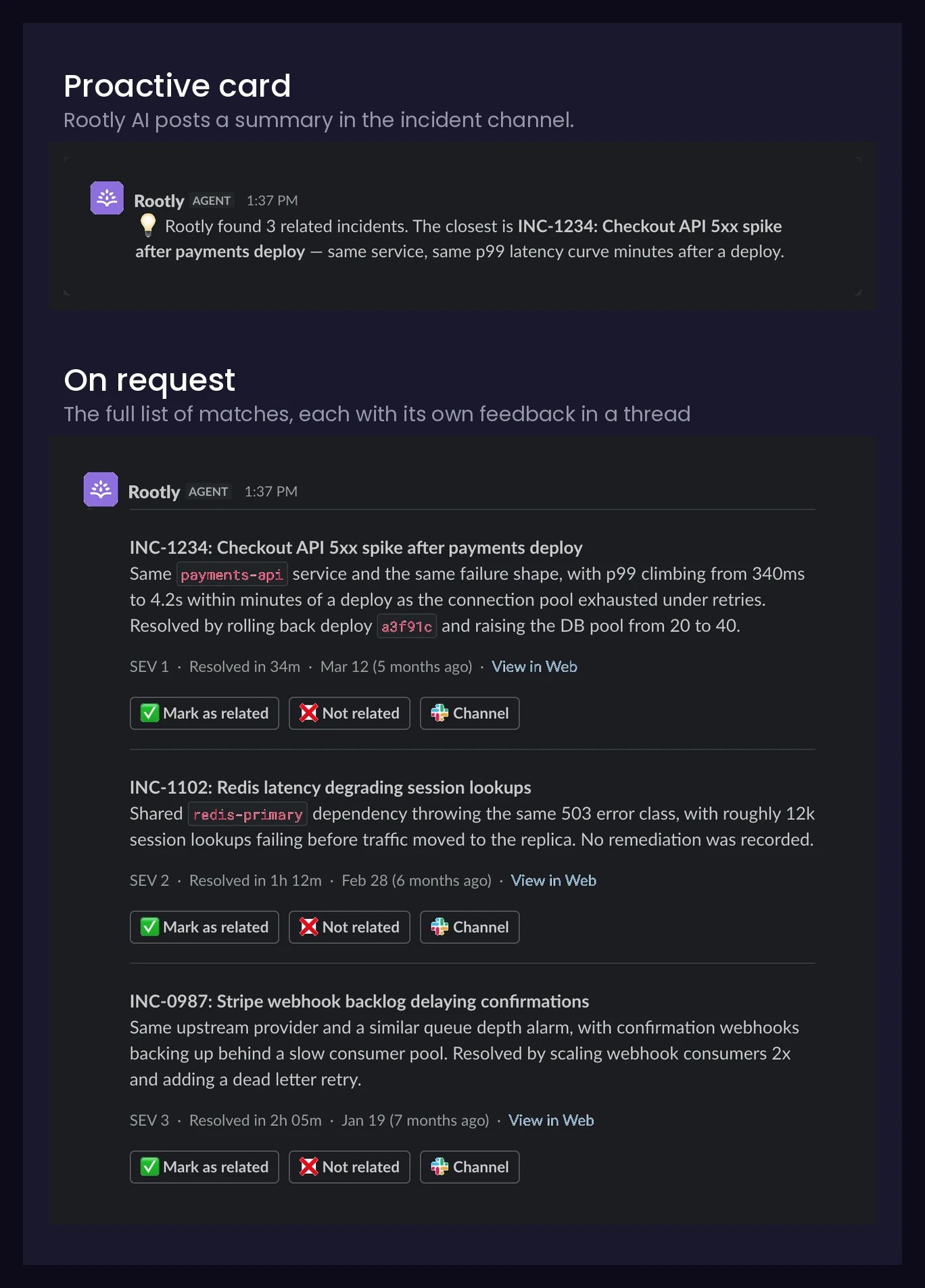 Matches surface right in the incident channel and on demand, whenever a responder asks.
### Acting on a Match
Every match card carries the same set of actions:
| Button | What it does |
| ------------------- | ---------------------------------------------------------------------------------------------------------------------- |
| **Mark as related** | Trains the model that this was a good match, so future recommendations within your team's incident set get better. |
| **Not related** | Trains the model that this was not a good match, so future recommendations within your team's incident set get better. |
| **Channel** | Opens the Slack incident channel for the related incident. |
| **View in Web** | Opens the related incident's details page in Rootly on the web. |
Feedback only shapes recommendations for your own team — it never trains models for other customers (see [Privacy](#privacy)).
***
## Grounded Answers
Ask `what fixed it?` and get an answer you can act on mid-incident:
* **On the record.** The documented resolution is relayed.
* **Nothing recorded.** Rootly AI says so and offers the retrospective or timeline.
Anything beyond your records is labeled inference ("the pattern suggests"), not fact.
***
## Selective by Design
* Reads each incident like a responder would: title, summary, severity, services, and more.
* Keeps only genuine, concrete relationships. Similar wording alone doesn't qualify.
Matching stays live: a new near-duplicate can hit rank #1 within minutes.
### What Qualifies as a Match
| Rule | Detail |
| ----------------------- | ---------------------------------------------------- |
| **Your org only** | Drawn exclusively from your team's incident history. |
| **Confirmed incidents** | Excludes cancelled incidents. |
| **Recent history** | Looks back 180 days by default. |
| **Public incidents** | Only what the whole channel can see. |
On first enable, your history processes gradually in the background. New incidents become matchable within minutes.
### Get Better Matches
* **Write specific titles and summaries.** Matching reads what you write.
* **Fill in the fields.** Every attribute is signal.
* **Record how incidents end.** Resolution notes and [retrospectives](/ai/ai-in-retrospectives/overview) answer "what fixed it?"
* **Rate the responses.** **Mark as related** / **Not related** tunes suggestions to the way your team works.
***
## Privacy
**Enforced in the product, not by prompt instructions:**
| Guarantee | Detail |
| ---------------------------------- | -------------------------------------------------------------------- |
| **Filtered before the AI writes** | The AI never references, or even alludes to, inaccessible incidents. |
| **Private incidents stay private** | Excluded from channels, for any asker or setting. |
| **Your history only** | Matches come only from your own incidents. |
| **No cross-customer training** | Your data never trains models for other customers. |
| **Permissions govern the subject** | Refuses questions about incidents you can't read. |
For retention and model detail, see [Data Privacy for Rootly AI](/ai/data-privacy-for-rootly-ai).
***
## Setup
Related Incidents is part of Rootly AI, behind the [organization-wide opt-in](/ai/ai-settings), and delivered by [Rootly Agent in Slack](/ai/rootly-in-slack/overview).
1. Open **AI & Agents**.
2. Under **Features**, toggle **Related incidents** on.
***
## Frequently Asked Questions
Nothing cleared the relevance bar. If just enabled, your history may still be processing. Confirm **Related incidents** and **Rootly Agent in Slack** are both on.
Most misses are eligibility: check [What Qualifies as a Match](#what-qualifies-as-a-match). Weak metadata can also keep a real match below the bar.
***
## Related Pages
Everything the agent can do in your incident channels.
What Rootly AI is and everything it can do.
Data handling and model training controls for Rootly AI.
Matches surface right in the incident channel and on demand, whenever a responder asks.
### Acting on a Match
Every match card carries the same set of actions:
| Button | What it does |
| ------------------- | ---------------------------------------------------------------------------------------------------------------------- |
| **Mark as related** | Trains the model that this was a good match, so future recommendations within your team's incident set get better. |
| **Not related** | Trains the model that this was not a good match, so future recommendations within your team's incident set get better. |
| **Channel** | Opens the Slack incident channel for the related incident. |
| **View in Web** | Opens the related incident's details page in Rootly on the web. |
Feedback only shapes recommendations for your own team — it never trains models for other customers (see [Privacy](#privacy)).
***
## Grounded Answers
Ask `what fixed it?` and get an answer you can act on mid-incident:
* **On the record.** The documented resolution is relayed.
* **Nothing recorded.** Rootly AI says so and offers the retrospective or timeline.
Anything beyond your records is labeled inference ("the pattern suggests"), not fact.
***
## Selective by Design
* Reads each incident like a responder would: title, summary, severity, services, and more.
* Keeps only genuine, concrete relationships. Similar wording alone doesn't qualify.
Matching stays live: a new near-duplicate can hit rank #1 within minutes.
### What Qualifies as a Match
| Rule | Detail |
| ----------------------- | ---------------------------------------------------- |
| **Your org only** | Drawn exclusively from your team's incident history. |
| **Confirmed incidents** | Excludes cancelled incidents. |
| **Recent history** | Looks back 180 days by default. |
| **Public incidents** | Only what the whole channel can see. |
On first enable, your history processes gradually in the background. New incidents become matchable within minutes.
### Get Better Matches
* **Write specific titles and summaries.** Matching reads what you write.
* **Fill in the fields.** Every attribute is signal.
* **Record how incidents end.** Resolution notes and [retrospectives](/ai/ai-in-retrospectives/overview) answer "what fixed it?"
* **Rate the responses.** **Mark as related** / **Not related** tunes suggestions to the way your team works.
***
## Privacy
**Enforced in the product, not by prompt instructions:**
| Guarantee | Detail |
| ---------------------------------- | -------------------------------------------------------------------- |
| **Filtered before the AI writes** | The AI never references, or even alludes to, inaccessible incidents. |
| **Private incidents stay private** | Excluded from channels, for any asker or setting. |
| **Your history only** | Matches come only from your own incidents. |
| **No cross-customer training** | Your data never trains models for other customers. |
| **Permissions govern the subject** | Refuses questions about incidents you can't read. |
For retention and model detail, see [Data Privacy for Rootly AI](/ai/data-privacy-for-rootly-ai).
***
## Setup
Related Incidents is part of Rootly AI, behind the [organization-wide opt-in](/ai/ai-settings), and delivered by [Rootly Agent in Slack](/ai/rootly-in-slack/overview).
1. Open **AI & Agents**.
2. Under **Features**, toggle **Related incidents** on.
***
## Frequently Asked Questions
Nothing cleared the relevance bar. If just enabled, your history may still be processing. Confirm **Related incidents** and **Rootly Agent in Slack** are both on.
Most misses are eligibility: check [What Qualifies as a Match](#what-qualifies-as-a-match). Weak metadata can also keep a real match below the bar.
***
## Related Pages
Everything the agent can do in your incident channels.
What Rootly AI is and everything it can do.
Data handling and model training controls for Rootly AI.